cce1901e90
* docs: switch security reporting to GitHub private vulnerability reporting

Replace the cncf-harbor-security mailing list with GitHub private
vulnerability reporting as the intake channel for security reports,
per goharbor/community#292. Private vulnerability reporting is enabled
on the repository.

- SECURITY.md: point reporters at the Security tab / Report a
  vulnerability form; describe the advisory-based triage, CVSS,
  in-band CVE request, and temporary private fork workflow; keep the
  mailing list only as a fallback for reporters without a GitHub
  account and for distributor list membership requests
- Add issue template contact link routing vulnerability reports to
  the private advisory form
- Add a security warning to the bug report template

Signed-off-by: Vadim Bauer <vb@container-registry.com>

* docs: make GitHub private reporting the sole intake channel

Address review feedback: drop the mailing-list fallback so there is a
single reporting method, clarify that the reporter can see their own
report, and fix template grammar.

Signed-off-by: Vadim Bauer <vb@container-registry.com>

* docs: address review feedback on security reporting switch

- Relax the response SLA: acknowledge within 5 business days, then
  investigate and follow up, instead of promising a full investigation
  plan within 3 business days.
- Request a CVE from GitHub only where GitHub is eligible as CNA; when
  another CNA already covers the affected component, coordinate with
  that CNA instead of filing a duplicate.
- Point README.md's vulnerability reporting section at private
  vulnerability reporting instead of the security mailing list.
- List cncf-harbor-security@lists.cncf.io again under Mailing lists,
  scoped to distributors-list administration, since the Embargo Policy
  and membership sections still reference it.
- Split the reporting paragraph, state the GitHub-account requirement as
  a deliberate single-channel decision, and stop overloading
  'acknowledged' to mean both receipt and triage verdict.
- Disable blank issues so reports cannot bypass the issue chooser and
  its security contact link.
- Note that larger artifacts are shared in the temporary private fork;
  the advisory form is not documented to accept attachments.

Signed-off-by: Vadim Bauer <vb@container-registry.com>

* docs: drop Notary from the dependency example list

Notary is no longer part of Harbor, so listing it as an example
dependency in the vulnerability-scope section is misleading. Also
normalises PGSql to PostgreSQL in the same list.

Signed-off-by: Vadim Bauer <vb@container-registry.com>

* docs: drop the Notary feature bullet from README

Notary is no longer part of Harbor, so advertising Docker Content Trust
signing via Notary in the feature list is misleading.

Signed-off-by: Vadim Bauer <vb@container-registry.com>

---------

Signed-off-by: Vadim Bauer <vb@container-registry.com>
10 KiB
Harbor






 Community Meeting Community Meeting |
|---|
| The Harbor Project holds bi-weekly community calls in two different timezones. To join the community calls or to watch previous meeting notes and recordings, please visit the meeting schedule. |
Note: The main branch may be in an unstable or even broken state during development.
Please use releases instead of the main branch in order to get a stable set of binaries.

Harbor is an open source trusted cloud native registry project that stores, signs, and scans content. Harbor extends the open source Docker Distribution by adding the functionalities usually required by users such as security, identity and management. Having a registry closer to the build and run environment can improve the image transfer efficiency. Harbor supports replication of images between registries, and also offers advanced security features such as user management, access control and activity auditing.
Harbor is hosted by the Cloud Native Computing Foundation (CNCF). If you are an organization that wants to help shape the evolution of cloud native technologies, consider joining the CNCF. For details about who is involved and how Harbor plays a role, read the CNCF announcement.
Features
- Cloud native registry: With support for both container images and Helm charts, Harbor serves as registry for cloud native environments like container runtimes and orchestration platforms.
- Role based access control: Users access different repositories through 'projects' and a user can have different permission for images or Helm charts under a project.
- Policy based replication: Images and charts can be replicated (synchronized) between multiple registry instances based on policies with using filters (repository, tag and label). Harbor automatically retries a replication if it encounters any errors. This can be used to assist loadbalancing, achieve high availability, and facilitate multi-datacenter deployments in hybrid and multi-cloud scenarios.
- Vulnerability Scanning: Harbor scans images regularly for vulnerabilities and has policy checks to prevent vulnerable images from being deployed.
- LDAP/AD support: Harbor integrates with existing enterprise LDAP/AD for user authentication and management, and supports importing LDAP groups into Harbor that can then be given permissions to specific projects.
- OIDC support: Harbor leverages OpenID Connect (OIDC) to verify the identity of users authenticated by an external authorization server or identity provider. Single sign-on can be enabled to log into the Harbor portal.
- Image deletion & garbage collection: System administrators can run garbage collection jobs so that images (dangling manifests and unreferenced blobs) can be deleted and their space can be freed up periodically.
- Graphical user portal: User can easily browse, search repositories and manage projects.
- Auditing: All the operations to the repositories are tracked through logs.
- RESTful API: RESTful APIs are provided to facilitate administrative operations, and are easy to use for integration with external systems. An embedded Swagger UI is available for exploring and testing the API.
- Easy deployment: Harbor can be deployed via Docker compose as well Helm Chart, and a Harbor Operator was added recently as well.
Architecture
For learning the architecture design of Harbor, check the document Architecture Overview of Harbor.
API
- Harbor RESTful API: The APIs for most administrative operations of Harbor and can be used to perform integrations with Harbor programmatically.
- Part 1: New or changed APIs
Install & Run
System requirements:
On a Linux host: docker 20.10.10-ce+ and docker-compose 1.18.0+.
Download binaries of Harbor release and follow Installation & Configuration Guide to install Harbor.
If you want to deploy Harbor on Kubernetes, please use the Harbor chart.
Refer to the documentation for more details on how to use Harbor.
Verifying Release Signatures
Starting with v2.15.0, Harbor release artifacts are cryptographically signed using Cosign to ensure authenticity and integrity.
Download the installers and signature bundles from the Harbor releases page.
Quick Verification
# Install Cosign (v2.0+)
brew install sigstore/tap/cosign

# Verify signature
cosign verify-blob \
  --bundle harbor-offline-installer-v2.15.0.tgz.sigstore.json \
  --certificate-oidc-issuer https://token.actions.githubusercontent.com \
  --certificate-identity-regexp '^https://github.com/goharbor/harbor/.github/workflows/publish_release.yml@refs/tags/v.*$' \
  harbor-offline-installer-v2.15.0.tgz
-
Expected output: Verified OK
-
Full verification guide: docs/signature-verification.md
OCI Distribution Conformance Tests
Check the OCI distribution conformance tests report of Harbor.
Compatibility
The compatibility list document provides compatibility information for the Harbor components.
Community
- Twitter: @project_harbor
- User Group: Join Harbor user email group: harbor-users@lists.cncf.io to get update of Harbor's news, features, releases, or to provide suggestion and feedback.
- Developer Group: Join Harbor developer group: harbor-dev@lists.cncf.io for discussion on Harbor development and contribution.
- Slack: Join Harbor's community for discussion and ask questions: Cloud Native Computing Foundation, channel: #harbor and #harbor-dev
Demos
- Live Demo - A demo environment with the latest Harbor stable build installed. For additional information please refer to this page.
- Video Demos - Demos for Harbor features and continuously updated.
Partners and Users
For a list of users, please refer to ADOPTERS.md.
Security
Security Audit
A third party security audit was performed by Cure53 in October 2019. You can see the full report here.
Reporting security vulnerabilities
If you've found a security related issue, a vulnerability, or a potential vulnerability in Harbor, do not file a public issue. Report it privately via GitHub private vulnerability reporting: open the Security tab and click Report a vulnerability. The Harbor Security Team will acknowledge your report, and will follow up in the advisory thread once we've identified the issue positively or negatively.
For further details please see our complete security release process.
License
Harbor is available under the Apache 2 license.
This project uses open source components which have additional licensing terms. The official docker images and licensing terms for these open source components can be found at the following locations:
- Photon OS 1.0: docker image, license
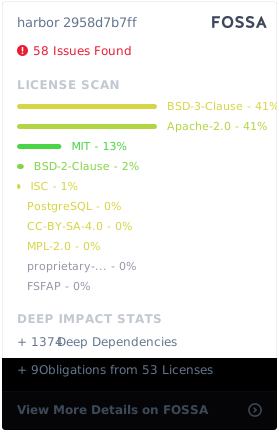
Fossa Status