mirror of
https://github.com/huggingface/diffusers.git
synced 2026-01-29 07:22:12 +03:00
 51d970d60d
* add stable diffusion jax guide


---------
Co-authored-by: Patrick von Platen <patrick.v.platen@gmail.com>
250 lines
10 KiB
Plaintext
250 lines
10 KiB
Plaintext
# 🧨 Stable Diffusion in JAX / Flax !
|
||
|
||
[[open-in-colab]]
|
||
|
||
🤗 Hugging Face [Diffusers](https://github.com/huggingface/diffusers) supports Flax since version `0.5.1`! This allows for super fast inference on Google TPUs, such as those available in Colab, Kaggle or Google Cloud Platform.
|
||
|
||
This notebook shows how to run inference using JAX / Flax. If you want more details about how Stable Diffusion works or want to run it in GPU, please refer to [this notebook](https://huggingface.co/docs/diffusers/stable_diffusion).
|
||
|
||
First, make sure you are using a TPU backend. If you are running this notebook in Colab, select `Runtime` in the menu above, then select the option "Change runtime type" and then select `TPU` under the `Hardware accelerator` setting.
|
||
|
||
Note that JAX is not exclusive to TPUs, but it shines on that hardware because each TPU server has 8 TPU accelerators working in parallel.
|
||
|
||
## Setup
|
||
|
||
First make sure diffusers is installed.
|
||
|
||
```bash
|
||
!pip install jax==0.3.25 jaxlib==0.3.25 flax transformers ftfy
|
||
!pip install diffusers
|
||
```
|
||
|
||
```python
|
||
import jax.tools.colab_tpu
|
||
|
||
jax.tools.colab_tpu.setup_tpu()
|
||
import jax
|
||
```
|
||
|
||
```python
|
||
num_devices = jax.device_count()
|
||
device_type = jax.devices()[0].device_kind
|
||
|
||
print(f"Found {num_devices} JAX devices of type {device_type}.")
|
||
assert (
|
||
"TPU" in device_type
|
||
), "Available device is not a TPU, please select TPU from Edit > Notebook settings > Hardware accelerator"
|
||
```
|
||
|
||
```python out
|
||
Found 8 JAX devices of type Cloud TPU.
|
||
```
|
||
|
||
Then we import all the dependencies.
|
||
|
||
```python
|
||
import numpy as np
|
||
import jax
|
||
import jax.numpy as jnp
|
||
|
||
from pathlib import Path
|
||
from jax import pmap
|
||
from flax.jax_utils import replicate
|
||
from flax.training.common_utils import shard
|
||
from PIL import Image
|
||
|
||
from huggingface_hub import notebook_login
|
||
from diffusers import FlaxStableDiffusionPipeline
|
||
```
|
||
|
||
## Model Loading
|
||
|
||
TPU devices support `bfloat16`, an efficient half-float type. We'll use it for our tests, but you can also use `float32` to use full precision instead.
|
||
|
||
```python
|
||
dtype = jnp.bfloat16
|
||
```
|
||
|
||
Flax is a functional framework, so models are stateless and parameters are stored outside them. Loading the pre-trained Flax pipeline will return both the pipeline itself and the model weights (or parameters). We are using a `bf16` version of the weights, which leads to type warnings that you can safely ignore.
|
||
|
||
```python
|
||
pipeline, params = FlaxStableDiffusionPipeline.from_pretrained(
|
||
"CompVis/stable-diffusion-v1-4",
|
||
revision="bf16",
|
||
dtype=dtype,
|
||
)
|
||
```
|
||
|
||
## Inference
|
||
|
||
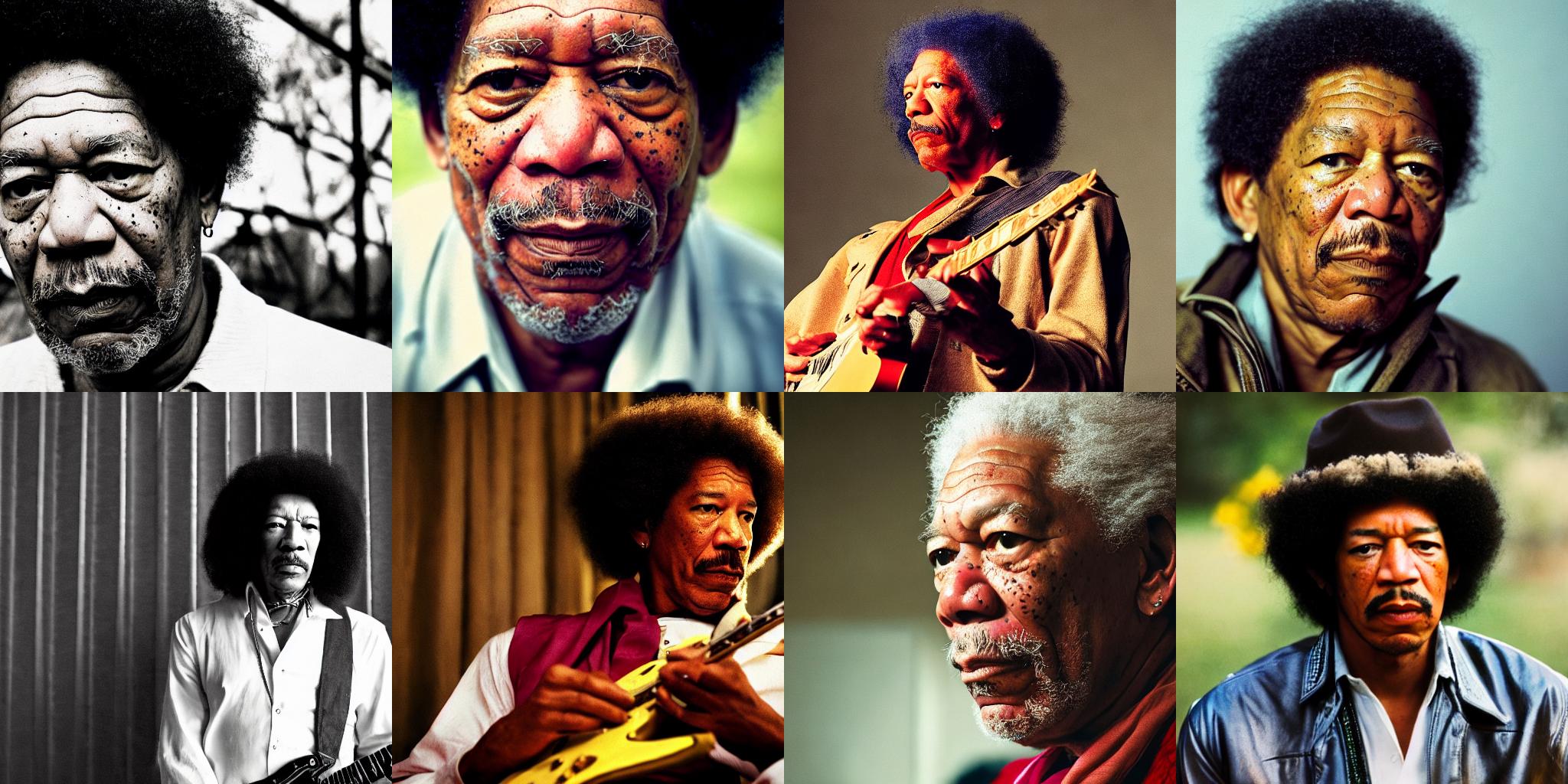
Since TPUs usually have 8 devices working in parallel, we'll replicate our prompt as many times as devices we have. Then we'll perform inference on the 8 devices at once, each responsible for generating one image. Thus, we'll get 8 images in the same amount of time it takes for one chip to generate a single one.
|
||
|
||
After replicating the prompt, we obtain the tokenized text ids by invoking the `prepare_inputs` function of the pipeline. The length of the tokenized text is set to 77 tokens, as required by the configuration of the underlying CLIP Text model.
|
||
|
||
```python
|
||
prompt = "A cinematic film still of Morgan Freeman starring as Jimi Hendrix, portrait, 40mm lens, shallow depth of field, close up, split lighting, cinematic"
|
||
prompt = [prompt] * jax.device_count()
|
||
prompt_ids = pipeline.prepare_inputs(prompt)
|
||
prompt_ids.shape
|
||
```
|
||
|
||
```python out
|
||
(8, 77)
|
||
```
|
||
|
||
### Replication and parallelization
|
||
|
||
Model parameters and inputs have to be replicated across the 8 parallel devices we have. The parameters dictionary is replicated using `flax.jax_utils.replicate`, which traverses the dictionary and changes the shape of the weights so they are repeated 8 times. Arrays are replicated using `shard`.
|
||
|
||
```python
|
||
p_params = replicate(params)
|
||
```
|
||
|
||
```python
|
||
prompt_ids = shard(prompt_ids)
|
||
prompt_ids.shape
|
||
```
|
||
|
||
```python out
|
||
(8, 1, 77)
|
||
```
|
||
|
||
That shape means that each one of the `8` devices will receive as an input a `jnp` array with shape `(1, 77)`. `1` is therefore the batch size per device. In TPUs with sufficient memory, it could be larger than `1` if we wanted to generate multiple images (per chip) at once.
|
||
|
||
We are almost ready to generate images! We just need to create a random number generator to pass to the generation function. This is the standard procedure in Flax, which is very serious and opinionated about random numbers – all functions that deal with random numbers are expected to receive a generator. This ensures reproducibility, even when we are training across multiple distributed devices.
|
||
|
||
The helper function below uses a seed to initialize a random number generator. As long as we use the same seed, we'll get the exact same results. Feel free to use different seeds when exploring results later in the notebook.
|
||
|
||
```python
|
||
def create_key(seed=0):
|
||
return jax.random.PRNGKey(seed)
|
||
```
|
||
|
||
We obtain a rng and then "split" it 8 times so each device receives a different generator. Therefore, each device will create a different image, and the full process is reproducible.
|
||
|
||
```python
|
||
rng = create_key(0)
|
||
rng = jax.random.split(rng, jax.device_count())
|
||
```
|
||
|
||
JAX code can be compiled to an efficient representation that runs very fast. However, we need to ensure that all inputs have the same shape in subsequent calls; otherwise, JAX will have to recompile the code, and we wouldn't be able to take advantage of the optimized speed.
|
||
|
||
The Flax pipeline can compile the code for us if we pass `jit = True` as an argument. It will also ensure that the model runs in parallel in the 8 available devices.
|
||
|
||
The first time we run the following cell it will take a long time to compile, but subequent calls (even with different inputs) will be much faster. For example, it took more than a minute to compile in a TPU v2-8 when I tested, but then it takes about **`7s`** for future inference runs.
|
||
|
||
```
|
||
%%time
|
||
images = pipeline(prompt_ids, p_params, rng, jit=True)[0]
|
||
```
|
||
|
||
```python out
|
||
CPU times: user 56.2 s, sys: 42.5 s, total: 1min 38s
|
||
Wall time: 1min 29s
|
||
```
|
||
|
||
The returned array has shape `(8, 1, 512, 512, 3)`. We reshape it to get rid of the second dimension and obtain 8 images of `512 × 512 × 3` and then convert them to PIL.
|
||
|
||
```python
|
||
images = images.reshape((images.shape[0] * images.shape[1],) + images.shape[-3:])
|
||
images = pipeline.numpy_to_pil(images)
|
||
```
|
||
|
||
### Visualization
|
||
|
||
Let's create a helper function to display images in a grid.
|
||
|
||
```python
|
||
def image_grid(imgs, rows, cols):
|
||
w, h = imgs[0].size
|
||
grid = Image.new("RGB", size=(cols * w, rows * h))
|
||
for i, img in enumerate(imgs):
|
||
grid.paste(img, box=(i % cols * w, i // cols * h))
|
||
return grid
|
||
```
|
||
|
||
```python
|
||
image_grid(images, 2, 4)
|
||
```
|
||
|
||
|
||
|
||
|
||
## Using different prompts
|
||
|
||
We don't have to replicate the _same_ prompt in all the devices. We can do whatever we want: generate 2 prompts 4 times each, or even generate 8 different prompts at once. Let's do that!
|
||
|
||
First, we'll refactor the input preparation code into a handy function:
|
||
|
||
```python
|
||
prompts = [
|
||
"Labrador in the style of Hokusai",
|
||
"Painting of a squirrel skating in New York",
|
||
"HAL-9000 in the style of Van Gogh",
|
||
"Times Square under water, with fish and a dolphin swimming around",
|
||
"Ancient Roman fresco showing a man working on his laptop",
|
||
"Close-up photograph of young black woman against urban background, high quality, bokeh",
|
||
"Armchair in the shape of an avocado",
|
||
"Clown astronaut in space, with Earth in the background",
|
||
]
|
||
```
|
||
|
||
```python
|
||
prompt_ids = pipeline.prepare_inputs(prompts)
|
||
prompt_ids = shard(prompt_ids)
|
||
|
||
images = pipeline(prompt_ids, p_params, rng, jit=True).images
|
||
images = images.reshape((images.shape[0] * images.shape[1],) + images.shape[-3:])
|
||
images = pipeline.numpy_to_pil(images)
|
||
|
||
image_grid(images, 2, 4)
|
||
```
|
||
|
||

|
||
|
||
|
||
## How does parallelization work?
|
||
|
||
We said before that the `diffusers` Flax pipeline automatically compiles the model and runs it in parallel on all available devices. We'll now briefly look inside that process to show how it works.
|
||
|
||
JAX parallelization can be done in multiple ways. The easiest one revolves around using the `jax.pmap` function to achieve single-program, multiple-data (SPMD) parallelization. It means we'll run several copies of the same code, each on different data inputs. More sophisticated approaches are possible, we invite you to go over the [JAX documentation](https://jax.readthedocs.io/en/latest/index.html) and the [`pjit` pages](https://jax.readthedocs.io/en/latest/jax-101/08-pjit.html?highlight=pjit) to explore this topic if you are interested!
|
||
|
||
`jax.pmap` does two things for us:
|
||
- Compiles (or `jit`s) the code, as if we had invoked `jax.jit()`. This does not happen when we call `pmap`, but the first time the pmapped function is invoked.
|
||
- Ensures the compiled code runs in parallel in all the available devices.
|
||
|
||
To show how it works we `pmap` the `_generate` method of the pipeline, which is the private method that runs generates images. Please, note that this method may be renamed or removed in future releases of `diffusers`.
|
||
|
||
```python
|
||
p_generate = pmap(pipeline._generate)
|
||
```
|
||
|
||
After we use `pmap`, the prepared function `p_generate` will conceptually do the following:
|
||
* Invoke a copy of the underlying function `pipeline._generate` in each device.
|
||
* Send each device a different portion of the input arguments. That's what sharding is used for. In our case, `prompt_ids` has shape `(8, 1, 77, 768)`. This array will be split in `8` and each copy of `_generate` will receive an input with shape `(1, 77, 768)`.
|
||
|
||
We can code `_generate` completely ignoring the fact that it will be invoked in parallel. We just care about our batch size (`1` in this example) and the dimensions that make sense for our code, and don't have to change anything to make it work in parallel.
|
||
|
||
The same way as when we used the pipeline call, the first time we run the following cell it will take a while, but then it will be much faster.
|
||
|
||
```
|
||
%%time
|
||
images = p_generate(prompt_ids, p_params, rng)
|
||
images = images.block_until_ready()
|
||
images.shape
|
||
```
|
||
|
||
```python out
|
||
CPU times: user 1min 15s, sys: 18.2 s, total: 1min 34s
|
||
Wall time: 1min 15s
|
||
```
|
||
|
||
```python
|
||
images.shape
|
||
```
|
||
|
||
```python out
|
||
(8, 1, 512, 512, 3)
|
||
```
|
||
|
||
We use `block_until_ready()` to correctly measure inference time, because JAX uses asynchronous dispatch and returns control to the Python loop as soon as it can. You don't need to use that in your code; blocking will occur automatically when you want to use the result of a computation that has not yet been materialized. |