 b3d10d6d65
* implement marigold depth and normals pipelines in diffusers core

* remove bibtex

* remove deprecations

* remove save_memory argument

* remove validate_vae

* remove config output

* remove batch_size autodetection

* remove presets logic
move default denoising_steps and processing_resolution into the model config
make default ensemble_size 1

* remove no_grad

* add fp16 to the example usage

* implement is_matplotlib_available
use is_matplotlib_available, is_scipy_available for conditional imports in the marigold depth pipeline

* move colormap, visualize_depth, and visualize_normals into export_utils.py

* make the denoising loop more lucid
fix the outputs to always be 4d tensors or lists of pil images
support a 4d input_image case
attempt to support model_cpu_offload_seq
move check_inputs into a separate function
change default batch_size to 1, remove any logic to make it bigger implicitly

* style

* rename denoising_steps into num_inference_steps

* rename input_image into image

* rename input_latent into latents

* remove decode_image
change decode_prediction to use the AutoencoderKL.decode method

* move clean_latent outside of progress_bar

* refactor marigold-reusable image processing bits into MarigoldImageProcessor class

* clean up the usage example docstring

* make ensemble functions members of the pipelines

* add early checks in check_inputs
rename E into ensemble_size in depth ensembling

* fix vae_scale_factor computation

* better compatibility with torch.compile
better variable naming

* move export_depth_to_png to export_utils

* remove encode_prediction

* improve visualize_depth and visualize_normals to accept multi-dimensional data and lists
remove visualization functions from the pipelines
move exporting depth as 16-bit PNGs functionality from the depth pipeline
update example docstrings

* do not shortcut vae.config variables

* change all asserts to raise ValueError

* rename output_prediction_type to output_type

* better variable names
clean up variable deletion code

* better variable names

* pass desc and leave kwargs into the diffusers progress_bar
implement nested progress bar for images and steps loops

* implement scale_invariant and shift_invariant flags in the ensemble_depth function
add scale_invariant and shift_invariant flags readout from the model config
further refactor ensemble_depth
support ensembling without alignment
add ensemble_depth docstring

* fix generator device placement checks

* move encode_empty_text body into the pipeline call

* minor empty text encoding simplifications

* adjust pipelines' class docstrings to explain the added construction arguments

* improve the scipy failure condition
add comments
improve docstrings
change the default use_full_z_range to True

* make input image values range check configurable in the preprocessor
refactor load_image_canonical in preprocessor to reject unknown types and return the image in the expected 4D format of tensor and on right device
support a list of everything as inputs to the pipeline, change type to PipelineImageInput
implement a check that all input list elements have the same dimensions
improve docstrings of pipeline outputs
remove check_input pipeline argument

* remove forgotten print

* add prediction_type model config

* add uncertainty visualization into export utils
fix NaN values in normals uncertainties

* change default of output_uncertainty to False
better handle the case of an attempt to export or visualize none

* fix `output_uncertainty=False`

* remove kwargs
fix check_inputs according to the new inputs of the pipeline

* rename prepare_latent into prepare_latents as in other pipelines
annotate prepare_latents in normals pipeline with "Copied from"
annotate encode_image in normals pipeline with "Copied from"

* move nested-capable `progress_bar` method into the pipelines
revert the original `progress_bar` method in pipeline_utils

* minor message improvement

* fix cpu offloading

* move colormap, visualize_depth, export_depth_to_16bit_png, visualize_normals, visualize_uncertainty to marigold_image_processing.py
update example docstrings

* fix missing comma

* change torch.FloatTensor to torch.Tensor

* fix importing of MarigoldImageProcessor

* fix vae offloading
fix batched image encoding
remove separate encode_image function and use vae.encode instead

* implement marigold's intial tests
relax generator checks in line with other pipelines
implement return_dict __call__ argument in line with other pipelines

* fix num_images computation

* remove MarigoldImageProcessor and outputs from import structure
update tests

* update docstrings

* update init

* update

* style

* fix

* fix

* up

* up

* up

* add simple test

* up

* update expected np input/output to be channel last

* move expand_tensor_or_array into the MarigoldImageProcessor

* rewrite tests to follow conventions - hardcoded slices instead of image artifacts
write more smoke tests

* add basic docs.

* add anton's contribution statement

* remove todos.

* fix assertion values for marigold depth slow tests

* fix assertion values for depth normals.

* remove print

* support AutoencoderTiny in the pipelines

* update documentation page
add Available Pipelines section
add Available Checkpoints section
add warning about num_inference_steps

* fix missing import in docstring
fix wrong value in visualize_depth docstring

* [doc] add marigold to pipelines overview

* [doc] add section "usage examples"

* fix an issue with latents check in the pipelines

* add "Frame-by-frame Video Processing with Consistency" section

* grammarly

* replace tables with images with css-styled images (blindly)

* style

* print

* fix the assertions.

* take from the github runner.

* take the slices from action artifacts

* style.

* update with the slices from the runner.

* remove unnecessary code blocks.

* Revert "[doc] add marigold to pipelines overview"

This reverts commit a505165150afd8dab23c474d1a054ea505a56a5f.

* remove invitation for new modalities

* split out marigold usage examples

* doc cleanup

---------

Co-authored-by: yiyixuxu <yixu310@gmail.com>
Co-authored-by: yiyixuxu <yixu310@gmail,com>
Co-authored-by: sayakpaul <spsayakpaul@gmail.com>
24 KiB
Marigold Pipelines for Computer Vision Tasks
Marigold is a novel diffusion-based dense prediction approach, and a set of pipelines for various computer vision tasks, such as monocular depth estimation.
This guide will show you how to use Marigold to obtain fast and high-quality predictions for images and videos.
Each pipeline supports one Computer Vision task, which takes an input RGB image as input and produces a prediction of the modality of interest, such as a depth map of the input image. Currently, the following tasks are implemented:
| Pipeline | Predicted Modalities | Demos |
|---|---|---|
| MarigoldDepthPipeline | Depth, Disparity | Fast Demo (LCM), Slow Original Demo (DDIM) |
| MarigoldNormalsPipeline | Surface normals | Fast Demo (LCM) |
The original checkpoints can be found under the PRS-ETH Hugging Face organization. These checkpoints are meant to work with diffusers pipelines and the original codebase. The original code can also be used to train new checkpoints.
| Checkpoint | Modality | Comment |
|---|---|---|
| prs-eth/marigold-v1-0 | Depth | The first Marigold Depth checkpoint, which predicts affine-invariant depth maps. The performance of this checkpoint in benchmarks was studied in the original paper. Designed to be used with the DDIMScheduler at inference, it requires at least 10 steps to get reliable predictions. Affine-invariant depth prediction has a range of values in each pixel between 0 (near plane) and 1 (far plane); both planes are chosen by the model as part of the inference process. See the MarigoldImageProcessor reference for visualization utilities. |
| prs-eth/marigold-lcm-v1-0 | Depth | The fast Marigold Depth checkpoint, fine-tuned from prs-eth/marigold-v1-0. Designed to be used with the LCMScheduler at inference, it requires as little as 1 step to get reliable predictions. The prediction reliability saturates at 4 steps and declines after that. |
| prs-eth/marigold-normals-v0-1 | Normals | A preview checkpoint for the Marigold Normals pipeline. Designed to be used with the DDIMScheduler at inference, it requires at least 10 steps to get reliable predictions. The surface normals predictions are unit-length 3D vectors with values in the range from -1 to 1. This checkpoint will be phased out after the release of v1-0 version. |
| prs-eth/marigold-normals-lcm-v0-1 | Normals | The fast Marigold Normals checkpoint, fine-tuned from prs-eth/marigold-normals-v0-1. Designed to be used with the LCMScheduler at inference, it requires as little as 1 step to get reliable predictions. The prediction reliability saturates at 4 steps and declines after that. This checkpoint will be phased out after the release of v1-0 version. |
| The examples below are mostly given for depth prediction, but they can be universally applied with other supported modalities. | ||
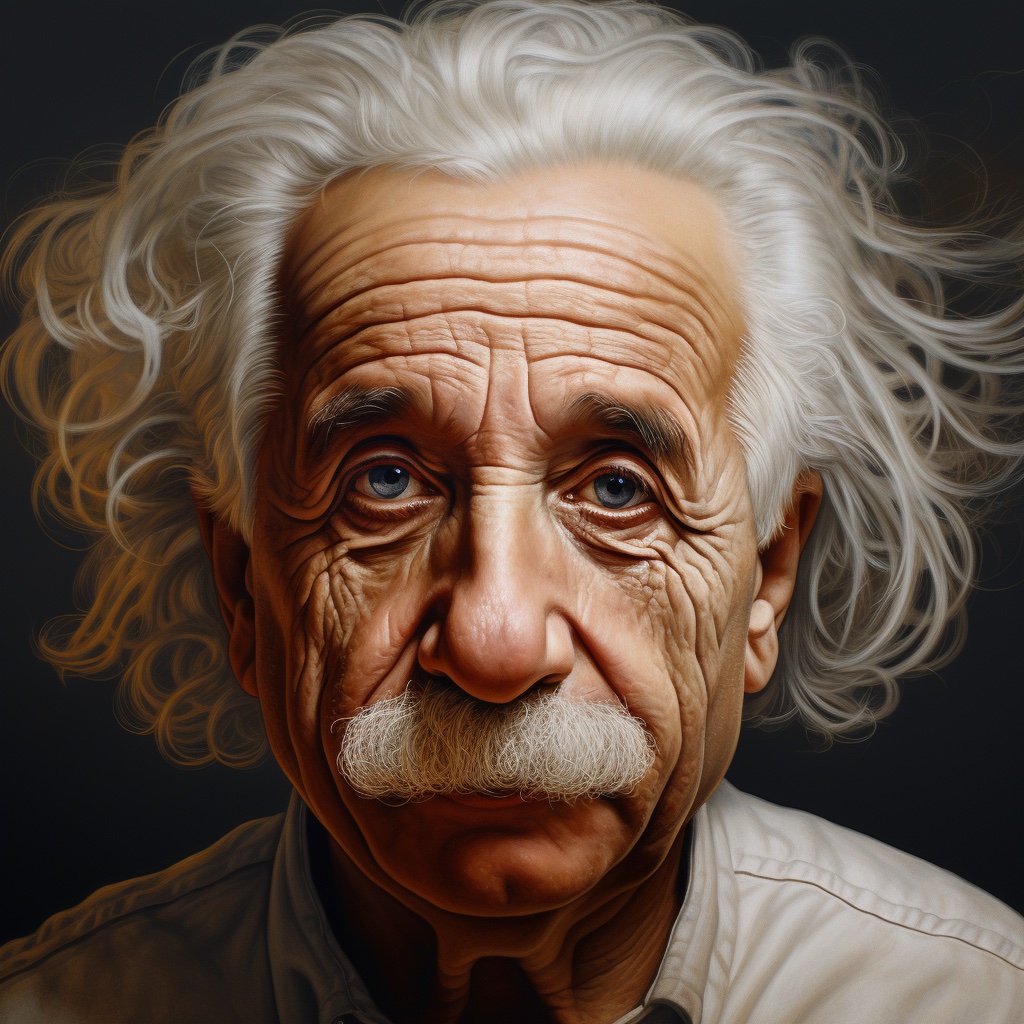
| We showcase the predictions using the same input image of Albert Einstein generated by Midjourney. | ||
| This makes it easier to compare visualizations of the predictions across various modalities and checkpoints. |
Depth Prediction Quick Start
To get the first depth prediction, load prs-eth/marigold-depth-lcm-v1-0 checkpoint into MarigoldDepthPipeline pipeline, put the image through the pipeline, and save the predictions:
import diffusers
import torch

pipe = diffusers.MarigoldDepthPipeline.from_pretrained(
    "prs-eth/marigold-depth-lcm-v1-0", variant="fp16", torch_dtype=torch.float16
).to("cuda")

image = diffusers.utils.load_image("https://marigoldmonodepth.github.io/images/einstein.jpg")
depth = pipe(image)

vis = pipe.image_processor.visualize_depth(depth.prediction)
vis[0].save("einstein_depth.png")

depth_16bit = pipe.image_processor.export_depth_to_16bit_png(depth.prediction)
depth_16bit[0].save("einstein_depth_16bit.png")
The visualization function for depth [~pipelines.marigold.marigold_image_processing.MarigoldImageProcessor.visualize_depth] applies one of matplotlib's colormaps (Spectral by default) to map the predicted pixel values from a single-channel [0, 1] depth range into an RGB image.
With the Spectral colormap, pixels with near depth are painted red, and far pixels are assigned blue color.
The 16-bit PNG file stores the single channel values mapped linearly from the [0, 1] range into [0, 65535].
Below are the raw and the visualized predictions; as can be seen, dark areas (mustache) are easier to distinguish in the visualization:


Surface Normals Prediction Quick Start
Load prs-eth/marigold-normals-lcm-v0-1 checkpoint into MarigoldNormalsPipeline pipeline, put the image through the pipeline, and save the predictions:
import diffusers
import torch

pipe = diffusers.MarigoldNormalsPipeline.from_pretrained(
    "prs-eth/marigold-normals-lcm-v0-1", variant="fp16", torch_dtype=torch.float16
).to("cuda")

image = diffusers.utils.load_image("https://marigoldmonodepth.github.io/images/einstein.jpg")
normals = pipe(image)

vis = pipe.image_processor.visualize_normals(normals.prediction)
vis[0].save("einstein_normals.png")
The visualization function for normals [~pipelines.marigold.marigold_image_processing.MarigoldImageProcessor.visualize_normals] maps the three-dimensional prediction with pixel values in the range [-1, 1] into an RGB image.
The visualization function supports flipping surface normals axes to make the visualization compatible with other choices of the frame of reference.
Conceptually, each pixel is painted according to the surface normal vector in the frame of reference, where X axis points right, Y axis points up, and Z axis points at the viewer.
Below is the visualized prediction:

In this example, the nose tip almost certainly has a point on the surface, in which the surface normal vector points straight at the viewer, meaning that its coordinates are [0, 0, 1].
This vector maps to the RGB [128, 128, 255], which corresponds to the violet-blue color.
Similarly, a surface normal on the cheek in the right part of the image has a large X component, which increases the red hue.
Points on the shoulders pointing up with a large Y promote green color.
Speeding up inference
The above quick start snippets are already optimized for speed: they load the LCM checkpoint, use the fp16 variant of weights and computation, and perform just one denoising diffusion step.
The pipe(image) call completes in 280ms on RTX 3090 GPU.
Internally, the input image is encoded with the Stable Diffusion VAE encoder, then the U-Net performs one denoising step, and finally, the prediction latent is decoded with the VAE decoder into pixel space.
In this case, two out of three module calls are dedicated to converting between pixel and latent space of LDM.
Because Marigold's latent space is compatible with the base Stable Diffusion, it is possible to speed up the pipeline call by more than 3x (85ms on RTX 3090) by using a lightweight replacement of the SD VAE:
  import diffusers
  import torch

  pipe = diffusers.MarigoldDepthPipeline.from_pretrained(
      "prs-eth/marigold-depth-lcm-v1-0", variant="fp16", torch_dtype=torch.float16
  ).to("cuda")

+ pipe.vae = diffusers.AutoencoderTiny.from_pretrained(
+ 	"madebyollin/taesd", torch_dtype=torch.float16
+ ).cuda()

  image = diffusers.utils.load_image("https://marigoldmonodepth.github.io/images/einstein.jpg")
  depth = pipe(image)
As suggested in Optimizations, adding torch.compile may squeeze extra performance depending on the target hardware:
  import diffusers
  import torch

  pipe = diffusers.MarigoldDepthPipeline.from_pretrained(
      "prs-eth/marigold-depth-lcm-v1-0", variant="fp16", torch_dtype=torch.float16
  ).to("cuda")

+ pipe.unet = torch.compile(pipe.unet, mode="reduce-overhead", fullgraph=True)

  image = diffusers.utils.load_image("https://marigoldmonodepth.github.io/images/einstein.jpg")
  depth = pipe(image)
Qualitative Comparison with Depth Anything
With the above speed optimizations, Marigold delivers predictions with more details and faster than Depth Anything with the largest checkpoint LiheYoung/depth-anything-large-hf:

Maximizing Precision and Ensembling
Marigold pipelines have a built-in ensembling mechanism combining multiple predictions from different random latents.
This is a brute-force way of improving the precision of predictions, capitalizing on the generative nature of diffusion.
The ensembling path is activated automatically when the ensemble_size argument is set greater than 1.
When aiming for maximum precision, it makes sense to adjust num_inference_steps simultaneously with ensemble_size.
The recommended values vary across checkpoints but primarily depend on the scheduler type.
The effect of ensembling is particularly well-seen with surface normals:
import diffusers

model_path = "prs-eth/marigold-normals-v1-0"

model_paper_kwargs = {
	diffusers.schedulers.DDIMScheduler: {
		"num_inference_steps": 10,
		"ensemble_size": 10,
	},
	diffusers.schedulers.LCMScheduler: {
		"num_inference_steps": 4,
		"ensemble_size": 5,
	},
}

image = diffusers.utils.load_image("https://marigoldmonodepth.github.io/images/einstein.jpg")

pipe = diffusers.MarigoldNormalsPipeline.from_pretrained(model_path).to("cuda")
pipe_kwargs = model_paper_kwargs[type(pipe.scheduler)]

depth = pipe(image, **pipe_kwargs)

vis = pipe.image_processor.visualize_normals(depth.prediction)
vis[0].save("einstein_normals.png")

As can be seen, all areas with fine-grained structurers, such as hair, got more conservative and on average more correct predictions. Such a result is more suitable for precision-sensitive downstream tasks, such as 3D reconstruction.
Quantitative Evaluation
To evaluate Marigold quantitatively in standard leaderboards and benchmarks (such as NYU, KITTI, and other datasets), follow the evaluation protocol outlined in the paper: load the full precision fp32 model and use appropriate values for num_inference_steps and ensemble_size.
Optionally seed randomness to ensure reproducibility. Maximizing batch_size will deliver maximum device utilization.
import diffusers
import torch

device = "cuda"
seed = 2024
model_path = "prs-eth/marigold-v1-0"

model_paper_kwargs = {
	diffusers.schedulers.DDIMScheduler: {
		"num_inference_steps": 50,
		"ensemble_size": 10,
	},
	diffusers.schedulers.LCMScheduler: {
		"num_inference_steps": 4,
		"ensemble_size": 10,
	},
}

image = diffusers.utils.load_image("https://marigoldmonodepth.github.io/images/einstein.jpg")

generator = torch.Generator(device=device).manual_seed(seed)
pipe = diffusers.MarigoldDepthPipeline.from_pretrained(model_path).to(device)
pipe_kwargs = model_paper_kwargs[type(pipe.scheduler)]

depth = pipe(image, generator=generator, **pipe_kwargs)

# evaluate metrics
Using Predictive Uncertainty
The ensembling mechanism built into Marigold pipelines combines multiple predictions obtained from different random latents.
As a side effect, it can be used to quantify epistemic (model) uncertainty; simply specify ensemble_size greater than 1 and set output_uncertainty=True.
The resulting uncertainty will be available in the uncertainty field of the output.
It can be visualized as follows:
import diffusers
import torch

pipe = diffusers.MarigoldDepthPipeline.from_pretrained(
    "prs-eth/marigold-depth-lcm-v1-0", variant="fp16", torch_dtype=torch.float16
).to("cuda")

image = diffusers.utils.load_image("https://marigoldmonodepth.github.io/images/einstein.jpg")
depth = pipe(
	image,
	ensemble_size=10,  # any number greater than 1; higher values yield higher precision
	output_uncertainty=True,
)

uncertainty = pipe.image_processor.visualize_uncertainty(depth.uncertainty)
uncertainty[0].save("einstein_depth_uncertainty.png")


The interpretation of uncertainty is easy: higher values (white) correspond to pixels, where the model struggles to make consistent predictions. Evidently, the depth model is the least confident around edges with discontinuity, where the object depth changes drastically. The surface normals model is the least confident in fine-grained structures, such as hair, and dark areas, such as the collar.
Frame-by-frame Video Processing with Temporal Consistency
Due to Marigold's generative nature, each prediction is unique and defined by the random noise sampled for the latent initialization. This becomes an obvious drawback compared to traditional end-to-end dense regression networks, as exemplified in the following videos:


To address this issue, it is possible to pass latents argument to the pipelines, which defines the starting point of diffusion.
Empirically, we found that a convex combination of the very same starting point noise latent and the latent corresponding to the previous frame prediction give sufficiently smooth results, as implemented in the snippet below:
import imageio
from PIL import Image
from tqdm import tqdm
import diffusers
import torch

device = "cuda"
path_in = "obama.mp4"
path_out = "obama_depth.gif"

pipe = diffusers.MarigoldDepthPipeline.from_pretrained(
    "prs-eth/marigold-lcm-v1-0", variant="fp16", torch_dtype=torch.float16
).to(device)
pipe.vae = diffusers.AutoencoderTiny.from_pretrained(
    "madebyollin/taesd", torch_dtype=torch.float16
).to(device)
pipe.set_progress_bar_config(disable=True)

with imageio.get_reader(path_in) as reader:
    size = reader.get_meta_data()['size']
    last_frame_latent = None
    latent_common = torch.randn(
        (1, 4, 768 * size[1] // (8 * max(size)), 768 * size[0] // (8 * max(size)))
    ).to(device=device, dtype=torch.float16)

    out = []
    for frame_id, frame in tqdm(enumerate(reader), desc="Processing Video"):
        frame = Image.fromarray(frame)
        latents = latent_common
        if last_frame_latent is not None:
            latents = 0.9 * latents + 0.1 * last_frame_latent

        depth = pipe(
			frame, match_input_resolution=False, latents=latents, output_latent=True,
        )
        last_frame_latent = depth.latent
        out.append(pipe.image_processor.visualize_depth(depth.prediction)[0])

    diffusers.utils.export_to_gif(out, path_out, fps=reader.get_meta_data()['fps'])
Here, the diffusion process starts from the given computed latent.
The pipeline sets output_latent=True to access out.latent and computes its contribution to the next frame's latent initialization.
The result is much more stable now:

Hopefully, you will find Marigold useful for solving your downstream tasks, be it a part of a more broad generative workflow, or a broader perception task, such as 3D reconstruction.