 5f740d0f55
* Initial code to add force_unmasked_unchanged argument to StableDiffusionInpaintPipeline.__call__. * Try to improve StableDiffusionInpaintPipelineFastTests.get_dummy_inputs. * Use original mask to preserve unmasked pixels in pixel space rather than latent space. * make style * start working on note in docs to force unmasked area to be unchanged * Add example of forcing the unmasked area to remain unchanged. * Revert "make style" This reverts commitfa7759293a. * Revert "Use original mask to preserve unmasked pixels in pixel space rather than latent space." This reverts commit092bd0e9e9. * Revert "Try to improve StableDiffusionInpaintPipelineFastTests.get_dummy_inputs." This reverts commitff41cf43c5. * Revert "Initial code to add force_unmasked_unchanged argument to StableDiffusionInpaintPipeline.__call__." This reverts commit989979752a. --------- Co-authored-by: Will Berman <wlbberman@gmail.com>
5.5 KiB
Text-guided image-inpainting
The [StableDiffusionInpaintPipeline] allows you to edit specific parts of an image by providing a mask and a text prompt. It uses a version of Stable Diffusion, like runwayml/stable-diffusion-inpainting specifically trained for inpainting tasks.
Get started by loading an instance of the [StableDiffusionInpaintPipeline]:
import PIL
import requests
import torch
from io import BytesIO

from diffusers import StableDiffusionInpaintPipeline

pipeline = StableDiffusionInpaintPipeline.from_pretrained(
    "runwayml/stable-diffusion-inpainting",
    torch_dtype=torch.float16,
    use_safetensors=True,
    variant="fp16",
)
pipeline = pipeline.to("cuda")
Download an image and a mask of a dog which you'll eventually replace:
def download_image(url):
    response = requests.get(url)
    return PIL.Image.open(BytesIO(response.content)).convert("RGB")


img_url = "https://raw.githubusercontent.com/CompVis/latent-diffusion/main/data/inpainting_examples/overture-creations-5sI6fQgYIuo.png"
mask_url = "https://raw.githubusercontent.com/CompVis/latent-diffusion/main/data/inpainting_examples/overture-creations-5sI6fQgYIuo_mask.png"

init_image = download_image(img_url).resize((512, 512))
mask_image = download_image(mask_url).resize((512, 512))
Now you can create a prompt to replace the mask with something else:
prompt = "Face of a yellow cat, high resolution, sitting on a park bench"
image = pipeline(prompt=prompt, image=init_image, mask_image=mask_image).images[0]
image |
mask_image |
prompt |
output |
|---|---|---|---|
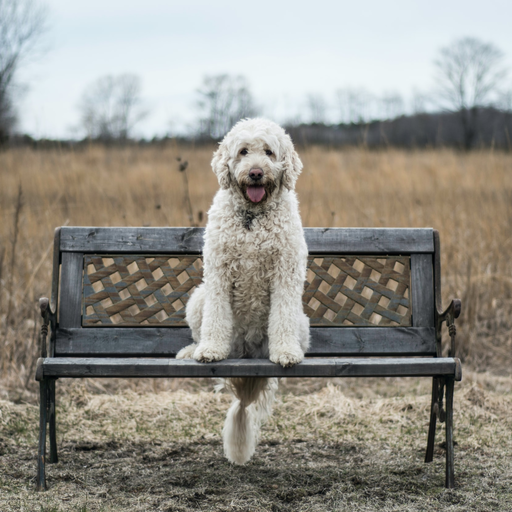 |
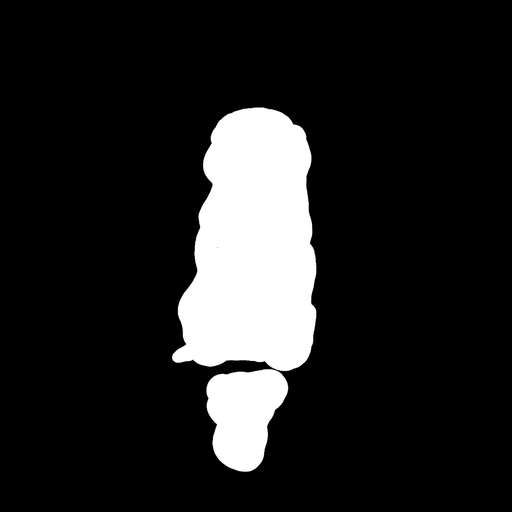 |
Face of a yellow cat, high resolution, sitting on a park bench | 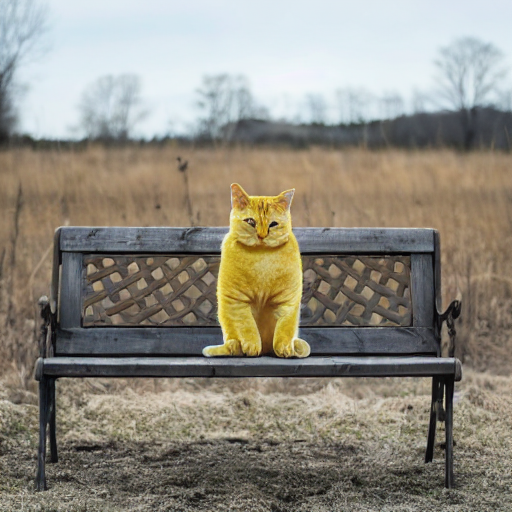 |
A previous experimental implementation of inpainting used a different, lower-quality process. To ensure backwards compatibility, loading a pretrained pipeline that doesn't contain the new model will still apply the old inpainting method.
Check out the Spaces below to try out image inpainting yourself!
Preserving the Unmasked Area of the Image
Generally speaking, [StableDiffusionInpaintPipeline] (and other inpainting pipelines) will change the unmasked part of the image as well. If this behavior is undesirable, you can force the unmasked area to remain the same as follows:
import PIL
import numpy as np
import torch

from diffusers import StableDiffusionInpaintPipeline
from diffusers.utils import load_image

device = "cuda"
pipeline = StableDiffusionInpaintPipeline.from_pretrained(
    "runwayml/stable-diffusion-inpainting",
    torch_dtype=torch.float16,
)
pipeline = pipeline.to(device)

img_url = "https://raw.githubusercontent.com/CompVis/latent-diffusion/main/data/inpainting_examples/overture-creations-5sI6fQgYIuo.png"
mask_url = "https://raw.githubusercontent.com/CompVis/latent-diffusion/main/data/inpainting_examples/overture-creations-5sI6fQgYIuo_mask.png"

init_image = load_image(img_url).resize((512, 512))
mask_image = load_image(mask_url).resize((512, 512))

prompt = "Face of a yellow cat, high resolution, sitting on a park bench"
repainted_image = pipeline(prompt=prompt, image=init_image, mask_image=mask_image).images[0]
repainted_image.save("repainted_image.png")

# Convert mask to grayscale NumPy array
mask_image_arr = np.array(mask_image.convert("L"))
# Add a channel dimension to the end of the grayscale mask
mask_image_arr = mask_image_arr[:, :, None]
# Binarize the mask: 1s correspond to the pixels which are repainted
mask_image_arr = mask_image_arr.astype(np.float32) / 255.0
mask_image_arr[mask_image_arr < 0.5] = 0
mask_image_arr[mask_image_arr >= 0.5] = 1

# Take the masked pixels from the repainted image and the unmasked pixels from the initial image
unmasked_unchanged_image_arr = (1 - mask_image_arr) * init_image_arr + mask_image_arr * repainted_image_arr
unmasked_unchanged_image = PIL.Image.fromarray(unmasked_unchanged_image_arr.round().astype("uint8"))
unmasked_unchanged_image.save("force_unmasked_unchanged.png")
Forcing the unmasked portion of the image to remain the same might result in some weird transitions between the unmasked and masked areas, since the model will typically change the masked and unmasked areas to make the transition more natural.