mirror of
https://github.com/huggingface/diffusers.git
synced 2026-01-29 07:22:12 +03:00

114 lines
3.7 KiB
Plaintext
114 lines
3.7 KiB
Plaintext
<!--Copyright 2023 The HuggingFace Team. All rights reserved.
|
|
|
|
Licensed under the Apache License, Version 2.0 (the "License"); you may not use this file except in compliance with
|
|
the License. You may obtain a copy of the License at
|
|
|
|
http://www.apache.org/licenses/LICENSE-2.0
|
|
|
|
Unless required by applicable law or agreed to in writing, software distributed under the License is distributed on
|
|
an "AS IS" BASIS, WITHOUT WARRANTIES OR CONDITIONS OF ANY KIND, either express or implied. See the License for the
|
|
specific language governing permissions and limitations under the License.
|
|
-->
|
|
|
|
# Text-Guided Image-to-Image Generation
|
|
|
|
[[open-in-colab]]
|
|
|
|
The [`StableDiffusionImg2ImgPipeline`] lets you pass a text prompt and an initial image to condition the generation of new images. This tutorial shows how to use it for text-guided image-to-image generation with Stable Diffusion model.
|
|
|
|
Before you begin, make sure you have all the necessary libraries installed:
|
|
|
|
```bash
|
|
!pip install diffusers transformers ftfy accelerate
|
|
```
|
|
|
|
Get started by creating a [`StableDiffusionImg2ImgPipeline`] with a pretrained Stable Diffusion model.
|
|
|
|
```python
|
|
import torch
|
|
import requests
|
|
from PIL import Image
|
|
from io import BytesIO
|
|
|
|
from diffusers import StableDiffusionImg2ImgPipeline
|
|
```
|
|
|
|
Load the pipeline:
|
|
|
|
```python
|
|
device = "cuda"
|
|
pipe = StableDiffusionImg2ImgPipeline.from_pretrained("runwayml/stable-diffusion-v1-5", torch_dtype=torch.float16).to(
|
|
device
|
|
)
|
|
```
|
|
|
|
Download an initial image and preprocess it so we can pass it to the pipeline:
|
|
|
|
```python
|
|
url = "https://raw.githubusercontent.com/CompVis/stable-diffusion/main/assets/stable-samples/img2img/sketch-mountains-input.jpg"
|
|
|
|
response = requests.get(url)
|
|
init_image = Image.open(BytesIO(response.content)).convert("RGB")
|
|
init_image.thumbnail((768, 768))
|
|
init_image
|
|
```
|
|
|
|
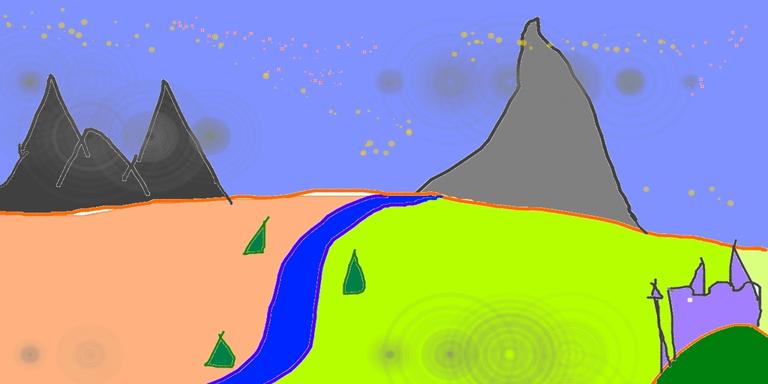
|
|
|
|
Define the prompt and run the pipeline:
|
|
|
|
```python
|
|
prompt = "A fantasy landscape, trending on artstation"
|
|
```
|
|
|
|
<Tip>
|
|
|
|
`strength` is a value between 0.0 and 1.0, that controls the amount of noise that is added to the input image. Values that approach 1.0 allow for lots of variations but will also produce images that are not semantically consistent with the input.
|
|
|
|
</Tip>
|
|
|
|
Let's generate two images with same pipeline and seed, but with different values for `strength`:
|
|
|
|
```python
|
|
generator = torch.Generator(device=device).manual_seed(1024)
|
|
image = pipe(prompt=prompt, image=init_image, strength=0.75, guidance_scale=7.5, generator=generator).images[0]
|
|
```
|
|
|
|
```python
|
|
image
|
|
```
|
|
|
|

|
|
|
|
|
|
```python
|
|
image = pipe(prompt=prompt, image=init_image, strength=0.5, guidance_scale=7.5, generator=generator).images[0]
|
|
image
|
|
```
|
|
|
|

|
|
|
|
|
|
As you can see, when using a lower value for `strength`, the generated image is more closer to the original `image`.
|
|
|
|
Now let's use a different scheduler - [LMSDiscreteScheduler](https://huggingface.co/docs/diffusers/api/schedulers#diffusers.LMSDiscreteScheduler):
|
|
|
|
```python
|
|
from diffusers import LMSDiscreteScheduler
|
|
|
|
lms = LMSDiscreteScheduler.from_config(pipe.scheduler.config)
|
|
pipe.scheduler = lms
|
|
```
|
|
|
|
```python
|
|
generator = torch.Generator(device=device).manual_seed(1024)
|
|
image = pipe(prompt=prompt, image=init_image, strength=0.75, guidance_scale=7.5, generator=generator).images[0]
|
|
```
|
|
|
|
```python
|
|
image
|
|
```
|
|
|
|

|
|
|