
33 KiB
Developer Guide: Building with Modular Diffusers
To implement new pipelines in the modular framework, you can use this process:
1. Start with an existing pipeline as a base
- Identify which existing pipeline is most similar to your target
- Determine what part of the pipeline need modification
2. Build a working pipeline structure first
- Assemble the complete pipeline structure
- Use existing blocks wherever possible
- For new blocks, create placeholders (e.g. you can copy from similar blocks and change the name) without implementing custom logic just yet
3. Set up an example and test incrementally
- Create a simple inference script with expected inputs/outputs
- Test incrementally as you implement changes
Let's see how this works with the Differential Diffusion example.
Differential Diffusion Pipeline
Differential diffusion (https://differential-diffusion.github.io/) is an image-to-image workflow, so it makes sense for us to start with the preset of pipeline blocks used to build img2img pipeline (IMAGE2IMAGE_BLOCKS) and see how we can build this new pipeline with them.
IMAGE2IMAGE_BLOCKS = InsertableOrderedDict([
    ("text_encoder", StableDiffusionXLTextEncoderStep),
    ("image_encoder", StableDiffusionXLVaeEncoderStep),
    ("input", StableDiffusionXLInputStep),
    ("set_timesteps", StableDiffusionXLImg2ImgSetTimestepsStep),
    ("prepare_latents", StableDiffusionXLImg2ImgPrepareLatentsStep),
    ("prepare_add_cond", StableDiffusionXLImg2ImgPrepareAdditionalConditioningStep),
    ("denoise", StableDiffusionXLDenoiseLoop),
    ("decode", StableDiffusionXLDecodeStep)
])
Note that "denoise" (StableDiffusionXLDenoiseLoop) is a loop that contains 3 loop blocks (more on SequentialLoopBlocks here)
denoise_blocks = IMAGE2IMAGE_BLOCKS["denoise"]()
print(denoise_blocks)
StableDiffusionXLDenoiseLoop(
  Class: StableDiffusionXLDenoiseLoopWrapper

  Description: Denoise step that iteratively denoise the latents.
      Its loop logic is defined in `StableDiffusionXLDenoiseLoopWrapper.__call__` method
      At each iteration, it runs blocks defined in `blocks` sequencially:
       - `StableDiffusionXLLoopBeforeDenoiser`
       - `StableDiffusionXLLoopDenoiser`
       - `StableDiffusionXLLoopAfterDenoiser`


  Components:
      scheduler (`EulerDiscreteScheduler`)
      guider (`ClassifierFreeGuidance`)
      unet (`UNet2DConditionModel`)

  Blocks:
    [0] before_denoiser (StableDiffusionXLLoopBeforeDenoiser)
       Description: step within the denoising loop that prepare the latent input for the denoiser. This block should be used to compose the `blocks` attribute of a `LoopSequentialPipelineBlocks` object (e.g. `StableDiffusionXLDenoiseLoopWrapper`)

    [1] denoiser (StableDiffusionXLLoopDenoiser)
       Description: Step within the denoising loop that denoise the latents with guidance. This block should be used to compose the `blocks` attribute of a `LoopSequentialPipelineBlocks` object (e.g. `StableDiffusionXLDenoiseLoopWrapper`)

    [2] after_denoiser (StableDiffusionXLLoopAfterDenoiser)
       Description: step within the denoising loop that update the latents. This block should be used to compose the `blocks` attribute of a `LoopSequentialPipelineBlocks` object (e.g. `StableDiffusionXLDenoiseLoopWrapper`)

)
Img2img diffusion pipeline adds the same noise level across all pixels based on a single strength parameter, however, differential diffusion uses a change map where each pixel value represents when that region should start denoising. Regions with lower change map values get "frozen" earlier in the denoising process by replacing them with noised original latents, effectively giving them fewer denoising steps and thus preserving more of the original image.
It has a different prepare_latents step and denoise step. At parepare_latents step, it prepares the change map and pre-computes the original noised latents for all timesteps. At each timestep during the denoising process, it selectively applies denoising based on the change map. Additionally, diff-diff does not use the strengh parameter, so its set_timesteps step is different from the one in image-to-image, but same as set_timesteps in text-to-image workflow.
So, to implement the differential diffusion pipeline, we can use pipeline blocks from image-to-image and text-to-image workflow, and change the prepare_latents step and the denoise step (more specifically, we only need to change the first part of denoise step where we prepare the latent input for the denoiser model).
Differential diffusion shares exact same pipeline structure as img2img. Here is a flowchart that puts the changes we need to make into the context of the pipeline structure.
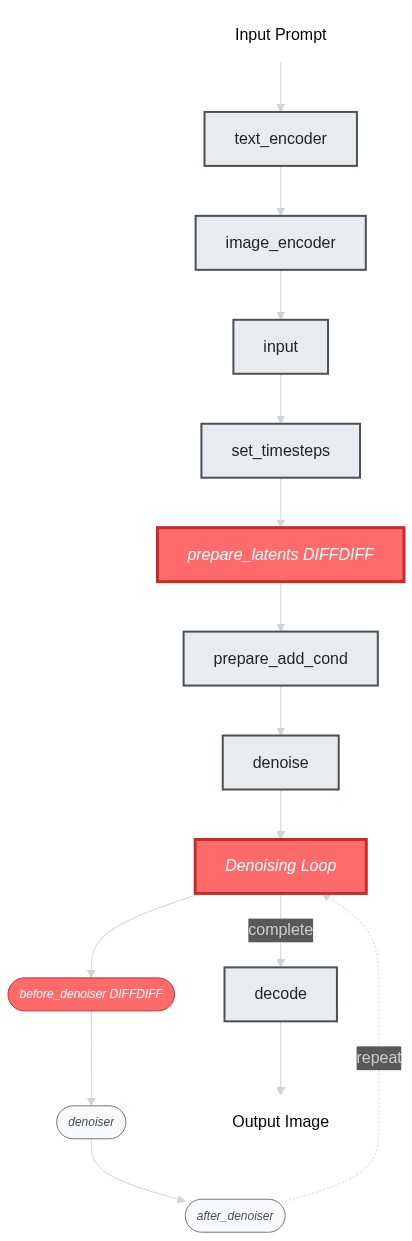
ok now we've identified the blocks to modify, let's build the pipeline skeleton first - at this stage, our goal is to get the pipeline struture working end-to-end (even though it's just doing the img2img behavior). I would simply create placeholder blocks by copying from existing ones:
# Copy existing blocks as placeholders
class SDXLDiffDiffPrepareLatentsStep(PipelineBlock):
    """Copied from StableDiffusionXLImg2ImgPrepareLatentsStep - will modify later"""
    # ... same implementation as StableDiffusionXLImg2ImgPrepareLatentsStep

class SDXLDiffDiffLoopBeforeDenoiser(PipelineBlock):
    """Copied from StableDiffusionXLLoopBeforeDenoiser - will modify later"""
    # ... same implementation as StableDiffusionXLLoopBeforeDenoiser
SDXLDiffDiffLoopBeforeDenoiser is the be part of the denoise loop we need to change. Let's use it to assemble a SDXLDiffDiffDenoiseLoop.
class SDXLDiffDiffDenoiseLoop(StableDiffusionXLDenoiseLoopWrapper):
    block_classes = [SDXLDiffDiffLoopBeforeDenoiser, StableDiffusionXLLoopDenoiser, StableDiffusionXLLoopAfterDenoiser]
    block_names = ["before_denoiser", "denoiser", "after_denoiser"]
Now we can put together our differential diffusion pipeline.
DIFFDIFF_BLOCKS = IMAGE2IMAGE_BLOCKS.copy()
DIFFDIFF_BLOCKS["set_timesteps"] = TEXT2IMAGE_BLOCKS["set_timesteps"]
DIFFDIFF_BLOCKS["prepare_latents"] = SDXLDiffDiffPrepareLatentsStep
DIFFDIFF_BLOCKS["denoise"] = SDXLDiffDiffDenoiseLoop

dd_blocks = SequentialPipelineBlocks.from_blocks_dict(DIFFDIFF_BLOCKS)
print(dd_blocks)
# At this point, the pipeline works exactly like img2img since our blocks are just copies
ok, so now our blocks should be able to compile without an error, we can move on to the next step. Let's setup a simple exapmple so we can run the pipeline as we build it. diff-diff use same components as SDXL so we can fetch the models from a regular SDXL repo.
dd_pipeline = dd_blocks.init_pipeline("YiYiXu/modular-demo-auto", collection="diffdiff")
dd_pipeline.load_componenets(torch_dtype=torch.float16)
dd_pipeline.to("cuda")
We will use this example script:
image = load_image("https://huggingface.co/datasets/OzzyGT/testing-resources/resolve/main/differential/20240329211129_4024911930.png?download=true")
mask = load_image("https://huggingface.co/datasets/OzzyGT/testing-resources/resolve/main/differential/gradient_mask.png?download=true")

prompt = "a green pear"
negative_prompt = "blurry"

image = dd_pipeline.run(
    prompt=prompt,
    negative_prompt=negative_prompt,
    num_inference_steps=25,
    diffdiff_map=mask,
    image=image,
    output="images"
)[0]

image.save("diffdiff_out.png")
If you run the script right now, you will get a complaint about unexpected input diffdiff_map.
and you would get the same result as the original img2img pipeline.
Let's modify the pipeline so that we can get expected result with this example script.
We'll start with the prepare_latents step, as it is the first step that gets called right after the input step. The main changes are:
- new input
diffdiff_map: It will become a new input to the pipeline after we built it. num_inference_stepsandtimestespas intermediates inputs: Both variables are created inset_timestepsblock, we need to list them as intermediates inputs so that we can now use them in__call__.- A new component
mask_processor: A default one will be created when we build the pipeline, but user can update it. - Inside
__call__, we created 2 new variables: the change mapdiffdiff_maskand the pre-computed noised latents for all timestepsoriginal_latents. We also need to list them as intermediates outputs so the we can use them in thedenoisestep later.
I have two tips I want to share for this process:
- use
print(dd_pipeline.doc)to check compiled inputs and outputs of the built piepline. e.g. after we addeddiffdiff_mapas an input in this step, we can runprint(dd_pipeline.doc)to verify that it shows up in the docstring as a user input. - insert
print(state)andprint(block_state)everywhere inside the__call__method to inspect the intermediate results.
This is the modified StableDiffusionXLImg2ImgPrepareLatentsStep we ended up with :
- class StableDiffusionXLImg2ImgPrepareLatentsStep(PipelineBlock):
+ class SDXLDiffDiffPrepareLatentsStep(PipelineBlock):
      model_name = "stable-diffusion-xl"

      @property
      def description(self) -> str:
          return (
-             "Step that prepares the latents for the image-to-image generation process"
+             "Step that prepares the latents for the differential diffusion generation process"
          )

      @property
      def expected_components(self) -> List[ComponentSpec]:
          return [
              ComponentSpec("vae", AutoencoderKL),
              ComponentSpec("scheduler", EulerDiscreteScheduler),
+             ComponentSpec(
+                 "mask_processor",
+                 VaeImageProcessor,
+                 config=FrozenDict({"do_normalize": False, "do_convert_grayscale": True}),
+                 default_creation_method="from_config",
+             )
          ]

      @property
      def inputs(self) -> List[Tuple[str, Any]]:
          return [
+             InputParam("diffdiff_map",required=True),
          ]

      @property
      def intermediates_inputs(self) -> List[InputParam]:
          return [
              InputParam("generator"),
-             InputParam("latent_timestep", required=True, type_hint=torch.Tensor, description="The timestep that represents the initial noise level for image-to-image/inpainting generation. Can be generated in set_timesteps step."),
+             InputParam("timesteps",type_hint=torch.Tensor, description="The timesteps to use for sampling. Can be generated in set_timesteps step."),
+             InputParam("num_inference_steps", type_hint=int, description="The number of inference steps to use for the denoising process. Can be generated in set_timesteps step."),
          ]

      @property
      def intermediates_outputs(self) -> List[OutputParam]:
          return [
+             OutputParam("original_latents", type_hint=torch.Tensor, description="The initial latents to use for the denoising process"),
+             OutputParam("diffdiff_masks", type_hint=torch.Tensor, description="The masks used for the differential diffusion denoising process"),
          ]

      @torch.no_grad()
      def __call__(self, components, state: PipelineState):
          block_state = self.get_block_state(state)
          block_state.dtype = components.vae.dtype
          block_state.device = components._execution_device

          block_state.add_noise = True if block_state.denoising_start is None else False
+         components.scheduler.set_begin_index(None)

          if block_state.latents is None:
              block_state.latents = prepare_latents_img2img(
                  components.vae,
                  components.scheduler,
                  block_state.image_latents,
-                 block_state.latent_timestep,
+                 block_state.timesteps,
                  block_state.batch_size,
                  block_state.num_images_per_prompt,
                  block_state.dtype,
                  block_state.device,
                  block_state.generator,
                  block_state.add_noise,
              )
+
+         latent_height = block_state.image_latents.shape[-2]
+         latent_width = block_state.image_latents.shape[-1]
+         diffdiff_map = components.mask_processor.preprocess(block_state.diffdiff_map, height=latent_height, width=latent_width)
+
+         diffdiff_map = diffdiff_map.squeeze(0).to(block_state.device)
+         thresholds = torch.arange(block_state.num_inference_steps, dtype=diffdiff_map.dtype) / block_state.num_inference_steps
+         thresholds = thresholds.unsqueeze(1).unsqueeze(1).to(block_state.device)
+         block_state.diffdiff_masks = diffdiff_map > (thresholds + (block_state.denoising_start or 0))
+         block_state.original_latents = block_state.latents

          self.add_block_state(state, block_state)
This is the modified before_denoiser step, we use diff-diff map to freeze certain regions in the latents before each denoising step.
class SDXLDiffDiffLoopBeforeDenoiser(PipelineBlock):
    model_name = "stable-diffusion-xl"

    @property
    def description(self) -> str:
        return (
-           "step within the denoising loop that prepare the latent input for the denoiser"
+           "Step within the denoising loop for differential diffusion that prepare the latent input for the denoiser"
        )

+   @property
+   def inputs(self) -> List[Tuple[str, Any]]:
+       return [
+           InputParam("denoising_start"),
+       ]

    @property
    def intermediates_inputs(self) -> List[str]:
        return [
            InputParam(
                "latents",
                required=True,
                type_hint=torch.Tensor,
                description="The initial latents to use for the denoising process. Can be generated in prepare_latent step."
            ),
+           InputParam(
+               "original_latents",
+               type_hint=torch.Tensor,
+               description="The initial latents to use for the denoising process. Can be generated in prepare_latent step."
+           ),
+           InputParam(
+               "diffdiff_masks",
+               type_hint=torch.Tensor,
+               description="The masks used for the differential diffusion denoising process, can be generated in prepare_latent step."
+           ),
        ]

    @torch.no_grad()
    def __call__(self, components, block_state, i, t):
+       # diff diff
+       if i == 0 and block_state.denoising_start is None:
+           block_state.latents = block_state.original_latents[:1]
+       else:
+           block_state.mask = block_state.diffdiff_masks[i].unsqueeze(0)
+           # cast mask to the same type as latents etc
+           block_state.mask = block_state.mask.to(block_state.latents.dtype)
+           block_state.mask = block_state.mask.unsqueeze(1)  # fit shape
+           block_state.latents = block_state.original_latents[i] * block_state.mask + block_state.latents * (1 - block_state.mask)
+       # end diff diff

+       # expand the latents if we are doing classifier free guidance
        block_state.scaled_latents = components.scheduler.scale_model_input(block_state.latents, t)

        return components, block_state
That's all there is to it! Now your script should run as expected and get a result like this one.
Here is the pipeline we created ( hint, print(dd_blocks))
It is a simple sequential pipeline.
SequentialPipelineBlocks(
  Class: ModularPipelineBlocks

  Description:


  Components:
      text_encoder (`CLIPTextModel`)
      text_encoder_2 (`CLIPTextModelWithProjection`)
      tokenizer (`CLIPTokenizer`)
      tokenizer_2 (`CLIPTokenizer`)
      guider (`ClassifierFreeGuidance`)
      vae (`AutoencoderKL`)
      image_processor (`VaeImageProcessor`)
      scheduler (`EulerDiscreteScheduler`)
      mask_processor (`VaeImageProcessor`)
      unet (`UNet2DConditionModel`)

  Configs:
      force_zeros_for_empty_prompt (default: True)
      requires_aesthetics_score (default: False)

  Blocks:
    [0] text_encoder (StableDiffusionXLTextEncoderStep)
       Description: Text Encoder step that generate text_embeddings to guide the image generation

    [1] image_encoder (StableDiffusionXLVaeEncoderStep)
       Description: Vae Encoder step that encode the input image into a latent representation

    [2] input (StableDiffusionXLInputStep)
       Description: Input processing step that:
                     1. Determines `batch_size` and `dtype` based on `prompt_embeds`
                     2. Adjusts input tensor shapes based on `batch_size` (number of prompts) and `num_images_per_prompt`

                   All input tensors are expected to have either batch_size=1 or match the batch_size
                   of prompt_embeds. The tensors will be duplicated across the batch dimension to
                   have a final batch_size of batch_size * num_images_per_prompt.

    [3] set_timesteps (StableDiffusionXLSetTimestepsStep)
       Description: Step that sets the scheduler's timesteps for inference

    [4] prepare_latents (SDXLDiffDiffPrepareLatentsStep)
       Description: Step that prepares the latents for the differential diffusion generation process

    [5] prepare_add_cond (StableDiffusionXLImg2ImgPrepareAdditionalConditioningStep)
       Description: Step that prepares the additional conditioning for the image-to-image/inpainting generation process

    [6] denoise (SDXLDiffDiffDenoiseLoop)
       Description: Pipeline block that iteratively denoise the latents over `timesteps`. The specific steps with each iteration can be customized with `blocks` attributes

    [7] decode (StableDiffusionXLDecodeStep)
       Description: Step that decodes the denoised latents into images

)
Now if you run the example we prepared earlier, you should see an apple with its right half transformed into a green pear.

Adding IP-adapter
We provide an auto IP-adapter block that you can plug-and-play into your modular workflow. It's an AutoPipelineBlocks, so it will only run when the user passes an IP adapter image. In this tutorial, we'll focus on how to package it into your differential diffusion workflow. To learn more about AutoPipelineBlocks, see here
Let's create IP-adapter block:
from diffusers.modular_pipelines.stable_diffusion_xl.encoders import StableDiffusionXLAutoIPAdapterStep
ip_adapter_block = StableDiffusionXLAutoIPAdapterStep()
print(ip_adapter_block)
It has 4 components: unet and guider are already used in diff-diff, but it also has two new ones: image_encoder and feature_extractor
 ip adapter block: StableDiffusionXLAutoIPAdapterStep(
  Class: AutoPipelineBlocks

  ====================================================================================================
  This pipeline contains blocks that are selected at runtime based on inputs.
  Trigger Inputs: {'ip_adapter_image'}
  Use `get_execution_blocks()` with input names to see selected blocks (e.g. `get_execution_blocks('ip_adapter_image')`).
  ====================================================================================================


  Description: Run IP Adapter step if `ip_adapter_image` is provided.


  Components:
      image_encoder (`CLIPVisionModelWithProjection`)
      feature_extractor (`CLIPImageProcessor`)
      unet (`UNet2DConditionModel`)
      guider (`ClassifierFreeGuidance`)

  Blocks:
    • ip_adapter [trigger: ip_adapter_image] (StableDiffusionXLIPAdapterStep)
       Description: IP Adapter step that handles all the ip adapter related tasks: Load/unload ip adapter weights into unet, prepare ip adapter image embeddings, etc See [ModularIPAdapterMixin](https://huggingface.co/docs/diffusers/api/loaders/ip_adapter#diffusers.loaders.ModularIPAdapterMixin) for more details

)
We can directly add the ip-adapter block instance to the diffdiff_blocks that we created before. The blocks attribute is a InsertableOrderedDict, so we're able to insert the it at specific position (index 0 here).
dd_blocks.blocks.insert("ip_adapter", ip_adapter_block, 0)
Take a look at the new diff-diff pipeline with ip-adapter!
print(dd_blocks)
The pipeline now lists ip-adapter as its first block, and tells you that it will run only if ip_adapter_image is provided. It also includes the two new components from ip-adpater: image_encoder and feature_extractor
SequentialPipelineBlocks(
  Class: ModularPipelineBlocks

  ====================================================================================================
  This pipeline contains blocks that are selected at runtime based on inputs.
  Trigger Inputs: {'ip_adapter_image'}
  Use `get_execution_blocks()` with input names to see selected blocks (e.g. `get_execution_blocks('ip_adapter_image')`).
  ====================================================================================================


  Description:


  Components:
      image_encoder (`CLIPVisionModelWithProjection`)
      feature_extractor (`CLIPImageProcessor`)
      unet (`UNet2DConditionModel`)
      guider (`ClassifierFreeGuidance`)
      text_encoder (`CLIPTextModel`)
      text_encoder_2 (`CLIPTextModelWithProjection`)
      tokenizer (`CLIPTokenizer`)
      tokenizer_2 (`CLIPTokenizer`)
      vae (`AutoencoderKL`)
      image_processor (`VaeImageProcessor`)
      scheduler (`EulerDiscreteScheduler`)
      mask_processor (`VaeImageProcessor`)

  Configs:
      force_zeros_for_empty_prompt (default: True)
      requires_aesthetics_score (default: False)

  Blocks:
    [0] ip_adapter (StableDiffusionXLAutoIPAdapterStep)
       Description: Run IP Adapter step if `ip_adapter_image` is provided.

    [1] text_encoder (StableDiffusionXLTextEncoderStep)
       Description: Text Encoder step that generate text_embeddings to guide the image generation

    [2] image_encoder (StableDiffusionXLVaeEncoderStep)
       Description: Vae Encoder step that encode the input image into a latent representation

    [3] input (StableDiffusionXLInputStep)
       Description: Input processing step that:
                     1. Determines `batch_size` and `dtype` based on `prompt_embeds`
                     2. Adjusts input tensor shapes based on `batch_size` (number of prompts) and `num_images_per_prompt`

                   All input tensors are expected to have either batch_size=1 or match the batch_size
                   of prompt_embeds. The tensors will be duplicated across the batch dimension to
                   have a final batch_size of batch_size * num_images_per_prompt.

    [4] set_timesteps (StableDiffusionXLSetTimestepsStep)
       Description: Step that sets the scheduler's timesteps for inference

    [5] prepare_latents (SDXLDiffDiffPrepareLatentsStep)
       Description: Step that prepares the latents for the differential diffusion generation process

    [6] prepare_add_cond (StableDiffusionXLImg2ImgPrepareAdditionalConditioningStep)
       Description: Step that prepares the additional conditioning for the image-to-image/inpainting generation process

    [7] denoise (SDXLDiffDiffDenoiseLoop)
       Description: Pipeline block that iteratively denoise the latents over `timesteps`. The specific steps with each iteration can be customized with `blocks` attributes

    [8] decode (StableDiffusionXLDecodeStep)
       Description: Step that decodes the denoised latents into images

)
Let's test it out. I used an orange image to condition the generation via ip-addapter and we can see a slight orange color and texture in the final output.
ip_adapter_block = StableDiffusionXLAutoIPAdapterStep()
dd_blocks.blocks.insert("ip_adapter", ip_adapter_block, 0)

dd_pipeline = dd_blocks.init_pipeline("YiYiXu/modular-demo-auto", collection="diffdiff")
dd_pipeline.load_components(torch_dtype=torch.float16)
dd_pipeline.loader.load_ip_adapter("h94/IP-Adapter", subfolder="sdxl_models", weight_name="ip-adapter_sdxl.bin")
dd_pipeline.loader.set_ip_adapter_scale(0.6)
dd_pipeline = dd_pipeline.to(device)

ip_adapter_image = load_image("https://huggingface.co/datasets/YiYiXu/testing-images/resolve/main/diffdiff_orange.jpeg")
image = load_image("https://huggingface.co/datasets/OzzyGT/testing-resources/resolve/main/differential/20240329211129_4024911930.png?download=true")
mask = load_image("https://huggingface.co/datasets/OzzyGT/testing-resources/resolve/main/differential/gradient_mask.png?download=true")

prompt = "a green pear"
negative_prompt = "blurry"
generator = torch.Generator(device=device).manual_seed(42)

image = dd_pipeline(
    prompt=prompt,
    negative_prompt=negative_prompt,
    num_inference_steps=25,
    generator=generator,
    ip_adapter_image=ip_adapter_image,
    diffdiff_map=mask,
    image=image,
    output="images"
)[0]
Working with ControlNets
What about controlnet? Can differential diffusion work with controlnet? The key differences between a regular pipeline and a ControlNet pipeline are: * A ControlNet input step that prepares the control condition * Inside the denoising loop, a modified denoiser step where the control image is first processed through ControlNet, then control information is injected into the UNet
From looking at the code workflow: differential diffusion only modifies the "before denoiser" step, while ControlNet operates within the "denoiser" itself. Since they intervene at different points in the pipeline, they should work together without conflicts.
Intuitively, these two techniques are orthogonal and should combine naturally: differential diffusion controls how much the inference process can deviate from the original in each region, while ControlNet controls in what direction that change occurs.
With this understanding, let's assemble the SDXLDiffDiffControlNetDenoiseLoop:
class SDXLDiffDiffControlNetDenoiseLoop(StableDiffusionXLDenoiseLoopWrapper):
    block_classes = [SDXLDiffDiffLoopBeforeDenoiser, StableDiffusionXLControlNetLoopDenoiser, StableDiffusionXLDenoiseLoopAfterDenoiser]
    block_names = ["before_denoiser", "denoiser", "after_denoiser"]

controlnet_denoise_block = SDXLDiffDiffControlNetDenoiseLoop()
# print(controlnet_denoise)
We provide a auto controlnet input block that you can directly put into your workflow: similar to auto ip-adapter block, this step will only run if control_image input is passed from user. It work with both controlnet and controlnet union.
from diffusers.modular_pipelines.stable_diffusion_xl.before_denoise import StableDiffusionXLControlNetAutoInput
control_input_block = StableDiffusionXLControlNetAutoInput()
print(control_input_block)
StableDiffusionXLControlNetAutoInput(
  Class: AutoPipelineBlocks

  ====================================================================================================
  This pipeline contains blocks that are selected at runtime based on inputs.
  Trigger Inputs: {'control_image', 'control_mode'}
  Use `get_execution_blocks()` with input names to see selected blocks (e.g. `get_execution_blocks('control_image')`).
  ====================================================================================================


  Description: Controlnet Input step that prepare the controlnet input.
      This is an auto pipeline block that works for both controlnet and controlnet_union.
       - `StableDiffusionXLControlNetUnionInputStep` is called to prepare the controlnet input when `control_mode` and `control_image` are provided.
       - `StableDiffusionXLControlNetInputStep` is called to prepare the controlnet input when `control_image` is provided.


  Components:
      controlnet (`ControlNetUnionModel`)
      control_image_processor (`VaeImageProcessor`)

  Blocks:
    • controlnet_union [trigger: control_mode] (StableDiffusionXLControlNetUnionInputStep)
       Description: step that prepares inputs for the ControlNetUnion model

    • controlnet [trigger: control_image] (StableDiffusionXLControlNetInputStep)
       Description: step that prepare inputs for controlnet

)
Let's assemble the blocks and run an example using controlnet + differential diffusion. I used a canny of a tomato as control_image, so you can see in the output, the right half that transformed into a pear had a tomato-like shape.
dd_blocks.blocks.insert("controlnet_input", control_input_block, 7)
dd_blocks.blocks["denoise"] = controlnet_denoise_block

dd_pipeline = dd_blocks.init_pipeline("YiYiXu/modular-demo-auto", collection="diffdiff")
dd_pipeline.load_components(torch_dtype=torch.float16)
dd_pipeline = dd_pipeline.to(device)

control_image = load_image("https://huggingface.co/datasets/YiYiXu/testing-images/resolve/main/diffdiff_tomato_canny.jpeg")
image = load_image("https://huggingface.co/datasets/OzzyGT/testing-resources/resolve/main/differential/20240329211129_4024911930.png?download=true")
mask = load_image("https://huggingface.co/datasets/OzzyGT/testing-resources/resolve/main/differential/gradient_mask.png?download=true")

prompt = "a green pear"
negative_prompt = "blurry"
generator = torch.Generator(device=device).manual_seed(42)

image = dd_pipeline(
    prompt=prompt,
    negative_prompt=negative_prompt,
    num_inference_steps=25,
    generator=generator,
    control_image=control_image,
    controlnet_conditioning_scale=0.5,
    diffdiff_map=mask,
    image=image,
    output="images"
)[0]
Optionally, We can combine SDXLDiffDiffControlNetDenoiseLoop and SDXLDiffDiffDenoiseLoop into a AutoPipelineBlocks so that same workflow can work with or without controlnet.
class SDXLDiffDiffAutoDenoiseStep(AutoPipelineBlocks):
    block_classes = [SDXLDiffDiffControlNetDenoiseLoop, SDXLDiffDiffDenoiseLoop]
    block_names = ["controlnet_denoise", "denoise"]
    block_trigger_inputs = ["controlnet_cond", None]
SDXLDiffDiffAutoDenoiseStep will run the ControlNet denoise step if control_image input is provided, otherwise it will run the regular denoise step.
We won't go into too much detail about AutoPipelineBlocks in this section, but you can read more about it here. Note that it's perfectly fine not to use AutoPipelineBlocks. In fact, we recommend only using AutoPipelineBlocks to package your workflow at the end once you've verified all your pipelines work as expected.
now you can create the differential diffusion preset that works with ip-adapter & controlnet.
DIFFDIFF_AUTO_BLOCKS = IMAGE2IMAGE_BLOCKS.copy()
DIFFDIFF_AUTO_BLOCKS["prepare_latents"] = SDXLDiffDiffPrepareLatentsStep
DIFFDIFF_AUTO_BLOCKS["set_timesteps"] = TEXT2IMAGE_BLOCKS["set_timesteps"]
DIFFDIFF_AUTO_BLOCKS["denoise"] = SDXLDiffDiffAutoDenoiseStep
DIFFDIFF_AUTO_BLOCKS.insert("ip_adapter", StableDiffusionXLAutoIPAdapterStep, 0)
DIFFDIFF_AUTO_BLOCKS.insert("controlnet_input",StableDiffusionXLControlNetAutoInput, 7)

print(DIFFDIFF_AUTO_BLOCKS)
to use
dd_auto_blocks = SequentialPipelineBlocks.from_blocks_dict(DIFFDIFF_AUTO_BLOCKS)
dd_pipeline = dd_auto_blocks.init_pipeline(...)
Creating a Modular Repo
You can easily share your differential diffusion workflow on the hub, by creating a modular repo like this https://huggingface.co/YiYiXu/modular-diffdiff
[YiYi TODO: add details tutorial on how to create the modular repo, building upon this https://github.com/huggingface/diffusers/pull/11462]
With a modular repo, it is very easy for the community to use the workflow you just created!
from diffusers.modular_pipelines import ModularPipeline, ComponentsManager
import torch
from diffusers.utils import load_image

repo_id = "YiYiXu/modular-diffdiff"

components = ComponentsManager()

diffdiff_pipeline = ModularPipeline.from_pretrained(repo_id, trust_remote_code=True, component_manager=components, collection="diffdiff")
diffdiff_pipeline.loader.load(torch_dtype=torch.float16)
components.enable_auto_cpu_offload()
see more usage example on model card
deploy a mellon node
YIYI TODO: an example of mellon node https://huggingface.co/YiYiXu/diff-diff-mellon