 7221eef457
* docs: fix latent -> latents in LTX latent upsampler docstrings

__call__ takes 'latents' (the docstring said 'latent', and its own
description says 'Input latents to normalize').

* docs: fix 'promt' typo in kandinsky5 default prompt templates

The default system template sent to the Qwen text encoder misspelled
'prompt engineer' as 'promt engineer' (4 pipelines).

Note: this changes the token sequence of the default template, so
default outputs will differ numerically from before / from the
upstream Kandinsky5 reference. If exact parity with the reference
repo is preferred, the reference itself would need the same fix.

* docs: fix docstring parameter names that do not match signatures

- flux controlnet encode_prompt documented a clip_skip parameter that
  does not exist (copy-paste from SD-style docs; flux has no CLIP
  layer-skipping)
- hunyuan_video1_5 pipelines documented num_images_per_prompt while
  the parameter is num_videos_per_prompt
- kandinsky5 _encode_prompt_qwen/_encode_prompt_clip documented
  num_videos_per_prompt, which neither method accepts

* docs(zh): fix English anchors pointing at translated Chinese headings

speed-memory-optims.md linked ./memory#model-offloading and
#group-offloading while the zh memory page translates those headings
(模型卸载 / 组卸载); using_peft_for_inference.md linked #hotswapping
while the zh heading is 热切换. Repointed at the Chinese slugs.

* docs: fix PAG anchor and the StableDiffusionPipelineSafe row in the SD overview

- pag.md linked #pagappliedlayers; the heading '### pag_applied_layers'
  keeps its underscores (#pag_applied_layers)
- the SD overview table linked ./stable_diffusion_safe, a doc page that
  no longer exists anywhere under docs/source; the row now names the
  deprecated pipeline as plain text instead of a dead link

* docs: fix dead Masked Im2Im TOC anchors in community pipelines README

The TOC rows linked #stable-diffusion-masked-im2im /
#stable-diffusion-xl-masked-im2im; the actual headings are
'Masked Im2Im Stable Diffusion Pipeline' and 'Masked Im2Im Stable
Diffusion Pipeline XL' (lines 3184/3219).

* docs(examples): drop duplicated 'with' in T5/Gemma sequence-length help strings

16 example scripts' --max_sequence_length help read 'to use with with
the T5 text encoder' (or the Gemma variant); surfaced in --help output.

* fix(links): keep the pag_applied_layers anchor in doc-builder form

doc-builder slugifies headings by dropping underscores, so the heading
'### pag_applied_layers' anchors as #pagappliedlayers — the form the
check-links CI expects. GitHub-style underscores broke it.

Signed-off-by: simpleqt <89645338+simpleqt@users.noreply.github.com>

* fix(kandinsky5): recompute prompt_template_encode_start_idx after the promt fix

Correcting 'promt' -> 'prompt' in the system templates shifts each
template's token count by one (verified with the Qwen2.5-VL tokenizer:
41->40, 55->54, 129->128, 129->128). Without this, the hardcoded start
indices slice the encoded prompt one token off.

---------

Signed-off-by: simpleqt <89645338+simpleqt@users.noreply.github.com>
11 KiB
Stable Diffusion pipelines

Stable Diffusion is a text-to-image latent diffusion model created by the researchers and engineers from CompVis, Stability AI and LAION. Latent diffusion applies the diffusion process over a lower dimensional latent space to reduce memory and compute complexity. This specific type of diffusion model was proposed in High-Resolution Image Synthesis with Latent Diffusion Models by Robin Rombach, Andreas Blattmann, Dominik Lorenz, Patrick Esser, Björn Ommer.
Stable Diffusion is trained on 512x512 images from a subset of the LAION-5B dataset. This model uses a frozen CLIP ViT-L/14 text encoder to condition the model on text prompts. With its 860M UNet and 123M text encoder, the model is relatively lightweight and can run on consumer GPUs.
For more details about how Stable Diffusion works and how it differs from the base latent diffusion model, take a look at the Stability AI announcement and our own blog post for more technical details.
You can find the original codebase for Stable Diffusion v1.0 at CompVis/stable-diffusion and Stable Diffusion v2.0 at Stability-AI/stablediffusion as well as their original scripts for various tasks. Additional official checkpoints for the different Stable Diffusion versions and tasks can be found on the CompVis and Stability AI Hub organizations. Explore these organizations to find the best checkpoint for your use-case!
The table below summarizes the available Stable Diffusion pipelines, their supported tasks, and an interactive demo:
| Pipeline | Supported tasks | 🤗 Space |
|---|---|---|
| StableDiffusion | text-to-image | 
|
| StableDiffusionImg2Img | image-to-image |
|
| StableDiffusionInpaint | inpainting |
|
| StableDiffusionDepth2Img | depth-to-image |
|
| StableDiffusionImageVariation | image variation |
|
| StableDiffusionPipelineSafe (deprecated; no doc page) | filtered text-to-image |
|
| StableDiffusion2 | text-to-image, inpainting, depth-to-image, super-resolution |
|
| StableDiffusionXL | text-to-image, image-to-image |
|
| StableDiffusionLatentUpscale | super-resolution |
|
| StableDiffusionUpscale | super-resolution | |
| StableDiffusionLDM3D | text-to-rgb, text-to-depth, text-to-pano |
|
| StableDiffusionUpscaleLDM3D | ldm3d super-resolution |
Tips
To help you get the most out of the Stable Diffusion pipelines, here are a few tips for improving performance and usability. These tips are applicable to all Stable Diffusion pipelines.
Explore tradeoff between speed and quality
[StableDiffusionPipeline] uses the [PNDMScheduler] by default, but 🤗 Diffusers provides many other schedulers (some of which are faster or output better quality) that are compatible. For example, if you want to use the [EulerDiscreteScheduler] instead of the default:
from diffusers import StableDiffusionPipeline, EulerDiscreteScheduler

pipeline = StableDiffusionPipeline.from_pretrained("CompVis/stable-diffusion-v1-4")
pipeline.scheduler = EulerDiscreteScheduler.from_config(pipeline.scheduler.config)

# or
euler_scheduler = EulerDiscreteScheduler.from_pretrained("CompVis/stable-diffusion-v1-4", subfolder="scheduler")
pipeline = StableDiffusionPipeline.from_pretrained("CompVis/stable-diffusion-v1-4", scheduler=euler_scheduler)
Reuse pipeline components to save memory
To save memory and use the same components across multiple pipelines, use the .components method to avoid loading weights into RAM more than once.
from diffusers import (
    StableDiffusionPipeline,
    StableDiffusionImg2ImgPipeline,
    StableDiffusionInpaintPipeline,
)

text2img = StableDiffusionPipeline.from_pretrained("CompVis/stable-diffusion-v1-4")
img2img = StableDiffusionImg2ImgPipeline(**text2img.components)
inpaint = StableDiffusionInpaintPipeline(**text2img.components)

# now you can use text2img(...), img2img(...), inpaint(...) just like the call methods of each respective pipeline
Create web demos using gradio
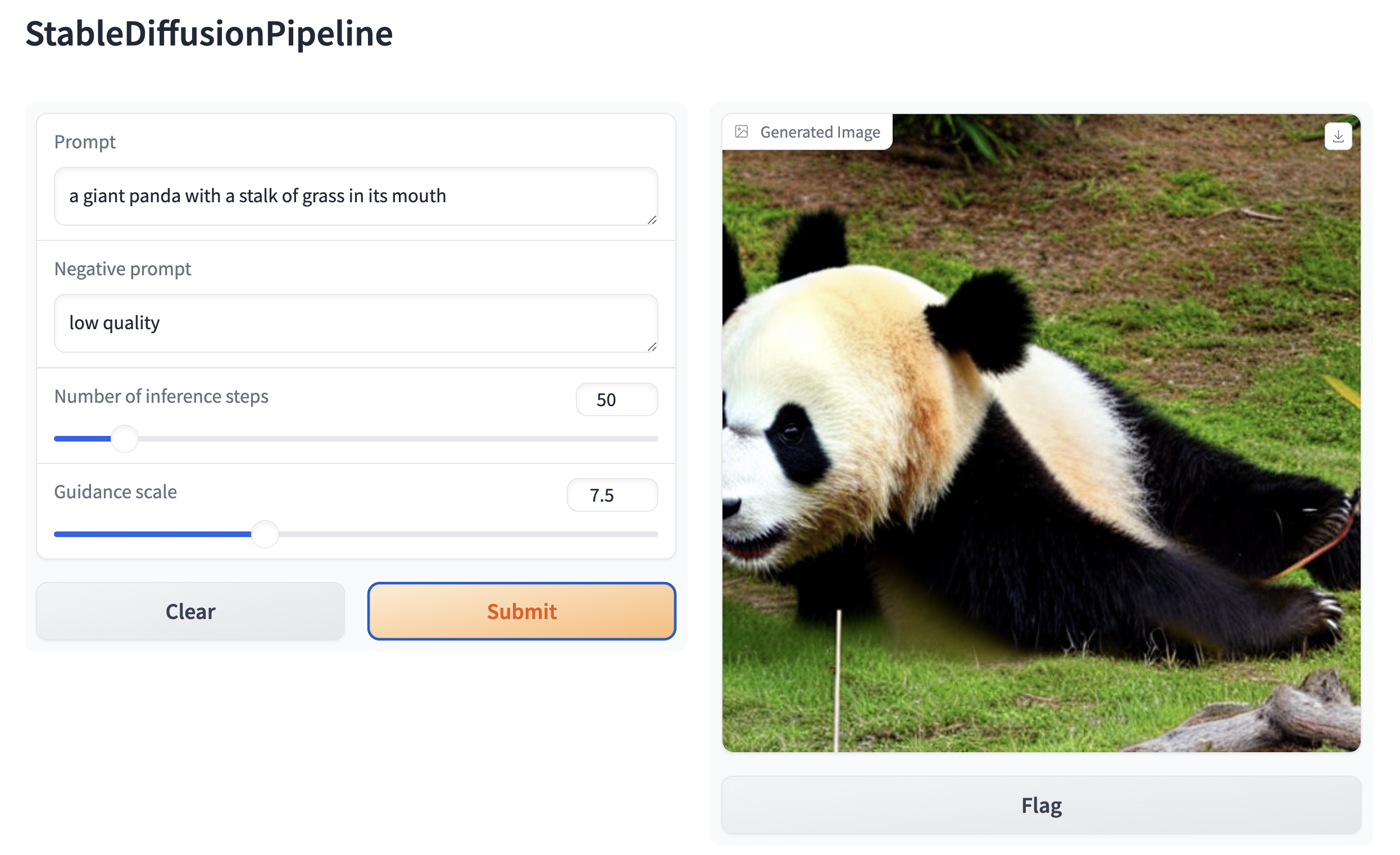
The Stable Diffusion pipelines are automatically supported in Gradio, a library that makes creating beautiful and user-friendly machine learning apps on the web a breeze. First, make sure you have Gradio installed:
pip install -U gradio
Then, create a web demo around any Stable Diffusion-based pipeline. For example, you can create an image generation pipeline in a single line of code with Gradio's Interface.from_pipeline function:
from diffusers import StableDiffusionPipeline
import gradio as gr

pipe = StableDiffusionPipeline.from_pretrained("CompVis/stable-diffusion-v1-4")

gr.Interface.from_pipeline(pipe).launch()
which opens an intuitive drag-and-drop interface in your browser:
Similarly, you could create a demo for an image-to-image pipeline with:
from diffusers import StableDiffusionImg2ImgPipeline
import gradio as gr


pipe = StableDiffusionImg2ImgPipeline.from_pretrained("stable-diffusion-v1-5/stable-diffusion-v1-5")

gr.Interface.from_pipeline(pipe).launch()
By default, the web demo runs on a local server. If you'd like to share it with others, you can generate a temporary public
link by setting share=True in launch(). Or, you can host your demo on Hugging Face Spaceshttps://huggingface.co/spaces for a permanent link.