 [Stable Diffusion](https://huggingface.co/docs/diffusers/stable_diffusion)와 같은 생성 모델의 평가는 주관적인 성격을 가지고 있습니다. 그러나 실무자와 연구자로서 우리는 종종 다양한 가능성 중에서 신중한 선택을 해야 합니다. 그래서 다양한 생성 모델 (GAN, Diffusion 등)을 사용할 때 어떻게 선택해야 할까요?
정성적인 평가는 모델의 이미지 품질에 대한 주관적인 평가이므로 오류가 발생할 수 있고 결정에 잘못된 영향을 미칠 수 있습니다. 반면, 정량적인 평가는 이미지 품질과 직접적인 상관관계를 갖지 않을 수 있습니다. 따라서 일반적으로 정성적 평가와 정량적 평가를 모두 고려하는 것이 더 강력한 신호를 제공하여 모델 선택에 도움이 됩니다.
이 문서에서는 Diffusion 모델을 평가하기 위한 정성적 및 정량적 방법에 대해 상세히 설명합니다. 정량적 방법에 대해서는 특히 `diffusers`와 함께 구현하는 방법에 초점을 맞추었습니다.
이 문서에서 보여진 방법들은 기반 생성 모델을 고정시키고 다양한 [노이즈 스케줄러](https://huggingface.co/docs/diffusers/main/en/api/schedulers/overview)를 평가하는 데에도 사용할 수 있습니다.
## 시나리오[[scenarios]]
다음과 같은 파이프라인을 사용하여 Diffusion 모델을 다룹니다:
- 텍스트로 안내된 이미지 생성 (예: [`StableDiffusionPipeline`](https://huggingface.co/docs/diffusers/main/en/api/pipelines/stable_diffusion/text2img)).
- 입력 이미지에 추가로 조건을 건 텍스트로 안내된 이미지 생성 (예: [`StableDiffusionImg2ImgPipeline`](https://huggingface.co/docs/diffusers/main/en/api/pipelines/stable_diffusion/img2img) 및 [`StableDiffusionInstructPix2PixPipeline`](https://huggingface.co/docs/diffusers/main/en/api/pipelines/pix2pix)).
- 클래스 조건화된 이미지 생성 모델 (예: [`DiTPipeline`](https://huggingface.co/docs/diffusers/main/en/api/pipelines/dit)).
## 정성적 평가[[qualitative-evaluation]]
정성적 평가는 일반적으로 생성된 이미지의 인간 평가를 포함합니다. 품질은 구성성, 이미지-텍스트 일치, 공간 관계 등과 같은 측면에서 측정됩니다. 일반적인 프롬프트는 주관적인 지표에 대한 일정한 기준을 제공합니다.
DrawBench와 PartiPrompts는 정성적인 벤치마킹에 사용되는 프롬프트 데이터셋입니다. DrawBench와 PartiPrompts는 각각 [Imagen](https://imagen.research.google/)과 [Parti](https://parti.research.google/)에서 소개되었습니다.
[Parti 공식 웹사이트](https://parti.research.google/)에서 다음과 같이 설명하고 있습니다:
> PartiPrompts (P2)는 이 작업의 일부로 공개되는 영어로 된 1600개 이상의 다양한 프롬프트 세트입니다. P2는 다양한 범주와 도전 측면에서 모델의 능력을 측정하는 데 사용할 수 있습니다.
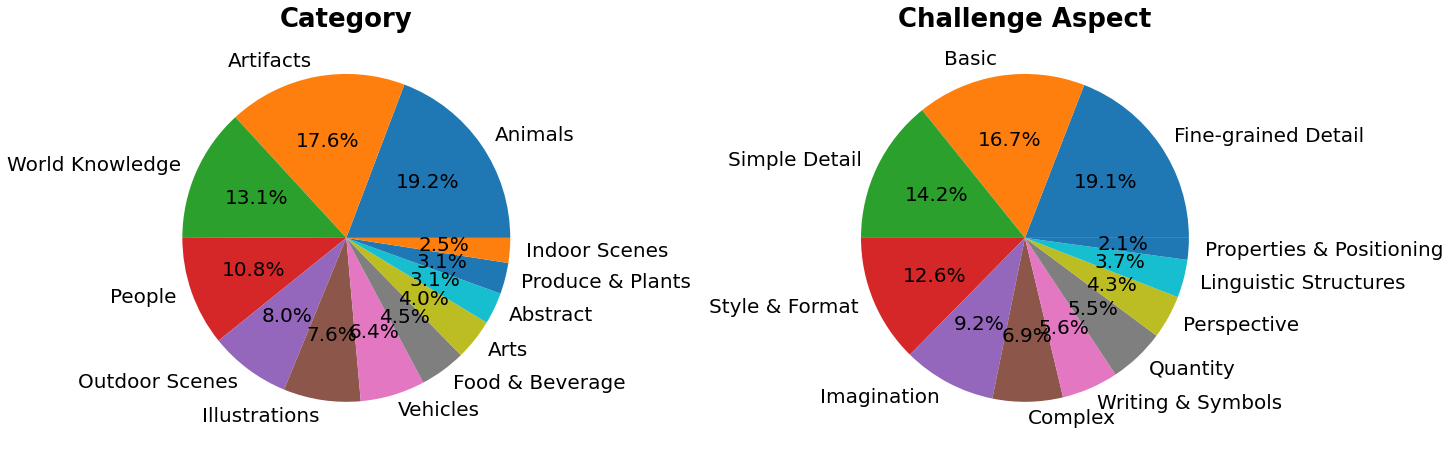
PartiPrompts는 다음과 같은 열을 가지고 있습니다:
- 프롬프트 (Prompt)
- 프롬프트의 카테고리 (예: "Abstract", "World Knowledge" 등)
- 난이도를 반영한 챌린지 (예: "Basic", "Complex", "Writing & Symbols" 등)
이러한 벤치마크는 서로 다른 이미지 생성 모델을 인간 평가로 비교할 수 있도록 합니다.
이를 위해 🧨 Diffusers 팀은 **Open Parti Prompts**를 구축했습니다. 이는 Parti Prompts를 기반으로 한 커뮤니티 기반의 질적 벤치마크로, 최첨단 오픈 소스 확산 모델을 비교하는 데 사용됩니다:
- [Open Parti Prompts 게임](https://huggingface.co/spaces/OpenGenAI/open-parti-prompts): 10개의 parti prompt에 대해 4개의 생성된 이미지가 제시되며, 사용자는 프롬프트에 가장 적합한 이미지를 선택합니다.
- [Open Parti Prompts 리더보드](https://huggingface.co/spaces/OpenGenAI/parti-prompts-leaderboard): 현재 최고의 오픈 소스 diffusion 모델들을 서로 비교하는 리더보드입니다.
이미지를 수동으로 비교하려면, `diffusers`를 사용하여 몇가지 PartiPrompts를 어떻게 활용할 수 있는지 알아봅시다.
다음은 몇 가지 다른 도전에서 샘플링한 프롬프트를 보여줍니다: Basic, Complex, Linguistic Structures, Imagination, Writing & Symbols. 여기서는 PartiPrompts를 [데이터셋](https://huggingface.co/datasets/nateraw/parti-prompts)으로 사용합니다.
```python
from datasets import load_dataset
# prompts = load_dataset("nateraw/parti-prompts", split="train")
# prompts = prompts.shuffle()
# sample_prompts = [prompts[i]["Prompt"] for i in range(5)]
# Fixing these sample prompts in the interest of reproducibility.
sample_prompts = [
"a corgi",
"a hot air balloon with a yin-yang symbol, with the moon visible in the daytime sky",
"a car with no windows",
"a cube made of porcupine",
'The saying "BE EXCELLENT TO EACH OTHER" written on a red brick wall with a graffiti image of a green alien wearing a tuxedo. A yellow fire hydrant is on a sidewalk in the foreground.',
]
```
이제 이런 프롬프트를 사용하여 Stable Diffusion ([v1-4 checkpoint](https://huggingface.co/CompVis/stable-diffusion-v1-4))를 사용한 이미지 생성을 할 수 있습니다 :
```python
import torch
seed = 0
generator = torch.manual_seed(seed)
images = sd_pipeline(sample_prompts, num_images_per_prompt=1, generator=generator).images
```

`num_images_per_prompt`를 설정하여 동일한 프롬프트에 대해 다른 이미지를 비교할 수도 있습니다. 다른 체크포인트([v1-5](https://huggingface.co/stable-diffusion-v1-5/stable-diffusion-v1-5))로 동일한 파이프라인을 실행하면 다음과 같은 결과가 나옵니다:

다양한 모델을 사용하여 모든 프롬프트에서 생성된 여러 이미지들이 생성되면 (평가 과정에서) 이러한 결과물들은 사람 평가자들에게 점수를 매기기 위해 제시됩니다. DrawBench와 PartiPrompts 벤치마크에 대한 자세한 내용은 각각의 논문을 참조하십시오.
> [!TIP]
> 모델이 훈련 중일 때 추론 샘플을 살펴보는 것은 훈련 진행 상황을 측정하는 데 유용합니다. [훈련 스크립트](https://github.com/huggingface/diffusers/tree/main/examples/)에서는 TensorBoard와 Weights & Biases에 대한 추가 지원과 함께 이 유틸리티를 지원합니다.
## 정량적 평가[[quantitative-evaluation]]
이 섹션에서는 세 가지 다른 확산 파이프라인을 평가하는 방법을 안내합니다:
- CLIP 점수
- CLIP 방향성 유사도
- FID
### 텍스트 안내 이미지 생성[[text-guided-image-generation]]
[CLIP 점수](https://huggingface.co/papers/2104.08718)는 이미지-캡션 쌍의 호환성을 측정합니다. 높은 CLIP 점수는 높은 호환성🔼을 나타냅니다. CLIP 점수는 이미지와 캡션 사이의 의미적 유사성으로 생각할 수도 있습니다. CLIP 점수는 인간 판단과 높은 상관관계를 가지고 있습니다.
[`StableDiffusionPipeline`]을 일단 로드해봅시다:
```python
from diffusers import StableDiffusionPipeline
import torch
model_ckpt = "CompVis/stable-diffusion-v1-4"
sd_pipeline = StableDiffusionPipeline.from_pretrained(model_ckpt, torch_dtype=torch.float16).to("cuda")
```
여러 개의 프롬프트를 사용하여 이미지를 생성합니다:
```python
prompts = [
"a photo of an astronaut riding a horse on mars",
"A high tech solarpunk utopia in the Amazon rainforest",
"A pikachu fine dining with a view to the Eiffel Tower",
"A mecha robot in a favela in expressionist style",
"an insect robot preparing a delicious meal",
"A small cabin on top of a snowy mountain in the style of Disney, artstation",
]
images = sd_pipeline(prompts, num_images_per_prompt=1, output_type="np").images
print(images.shape)
# (6, 512, 512, 3)
```
그러고 나서 CLIP 점수를 계산합니다.
```python
from torchmetrics.functional.multimodal import clip_score
from functools import partial
clip_score_fn = partial(clip_score, model_name_or_path="openai/clip-vit-base-patch16")
def calculate_clip_score(images, prompts):
images_int = (images * 255).astype("uint8")
clip_score = clip_score_fn(torch.from_numpy(images_int).permute(0, 3, 1, 2), prompts).detach()
return round(float(clip_score), 4)
sd_clip_score = calculate_clip_score(images, prompts)
print(f"CLIP score: {sd_clip_score}")
# CLIP score: 35.7038
```
위의 예제에서는 각 프롬프트 당 하나의 이미지를 생성했습니다. 만약 프롬프트 당 여러 이미지를 생성한다면, 프롬프트 당 생성된 이미지의 평균 점수를 사용해야 합니다.
이제 [`StableDiffusionPipeline`]과 호환되는 두 개의 체크포인트를 비교하려면, 파이프라인을 호출할 때 generator를 전달해야 합니다. 먼저, 고정된 시드로 [v1-4 Stable Diffusion 체크포인트](https://huggingface.co/CompVis/stable-diffusion-v1-4)를 사용하여 이미지를 생성합니다:
```python
seed = 0
generator = torch.manual_seed(seed)
images = sd_pipeline(prompts, num_images_per_prompt=1, generator=generator, output_type="np").images
```
그런 다음 [v1-5 checkpoint](https://huggingface.co/stable-diffusion-v1-5/stable-diffusion-v1-5)를 로드하여 이미지를 생성합니다:
```python
model_ckpt_1_5 = "stable-diffusion-v1-5/stable-diffusion-v1-5"
sd_pipeline_1_5 = StableDiffusionPipeline.from_pretrained(model_ckpt_1_5, torch_dtype=weight_dtype).to(device)
images_1_5 = sd_pipeline_1_5(prompts, num_images_per_prompt=1, generator=generator, output_type="np").images
```
그리고 마지막으로 CLIP 점수를 비교합니다:
```python
sd_clip_score_1_4 = calculate_clip_score(images, prompts)
print(f"CLIP Score with v-1-4: {sd_clip_score_1_4}")
# CLIP Score with v-1-4: 34.9102
sd_clip_score_1_5 = calculate_clip_score(images_1_5, prompts)
print(f"CLIP Score with v-1-5: {sd_clip_score_1_5}")
# CLIP Score with v-1-5: 36.2137
```
[v1-5](https://huggingface.co/stable-diffusion-v1-5/stable-diffusion-v1-5) 체크포인트가 이전 버전보다 더 나은 성능을 보이는 것 같습니다. 그러나 CLIP 점수를 계산하기 위해 사용한 프롬프트의 수가 상당히 적습니다. 보다 실용적인 평가를 위해서는 이 수를 훨씬 높게 설정하고, 프롬프트를 다양하게 사용해야 합니다.
> [!WARNING]
> 이 점수에는 몇 가지 제한 사항이 있습니다. 훈련 데이터셋의 캡션은 웹에서 크롤링되어 이미지와 관련된 `alt` 및 유사한 태그에서 추출되었습니다. 이들은 인간이 이미지를 설명하는 데 사용할 수 있는 것과 일치하지 않을 수 있습니다. 따라서 여기서는 몇 가지 프롬프트를 "엔지니어링"해야 했습니다.
### 이미지 조건화된 텍스트-이미지 생성[[image-conditioned-text-to-image-generation]]
이 경우, 생성 파이프라인을 입력 이미지와 텍스트 프롬프트로 조건화합니다. [`StableDiffusionInstructPix2PixPipeline`]을 예로 들어보겠습니다. 이는 편집 지시문을 입력 프롬프트로 사용하고 편집할 입력 이미지를 사용합니다.
다음은 하나의 예시입니다:
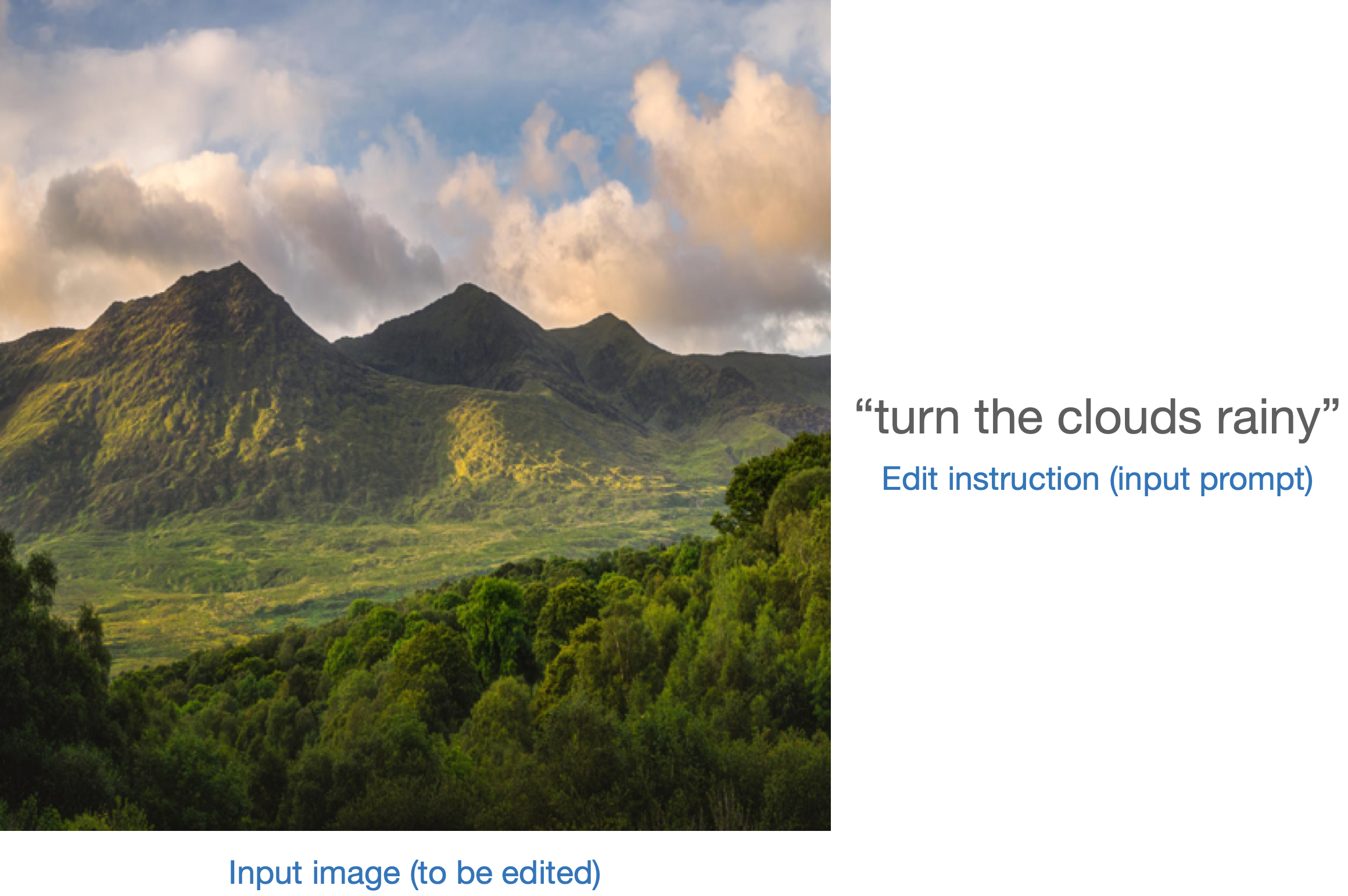
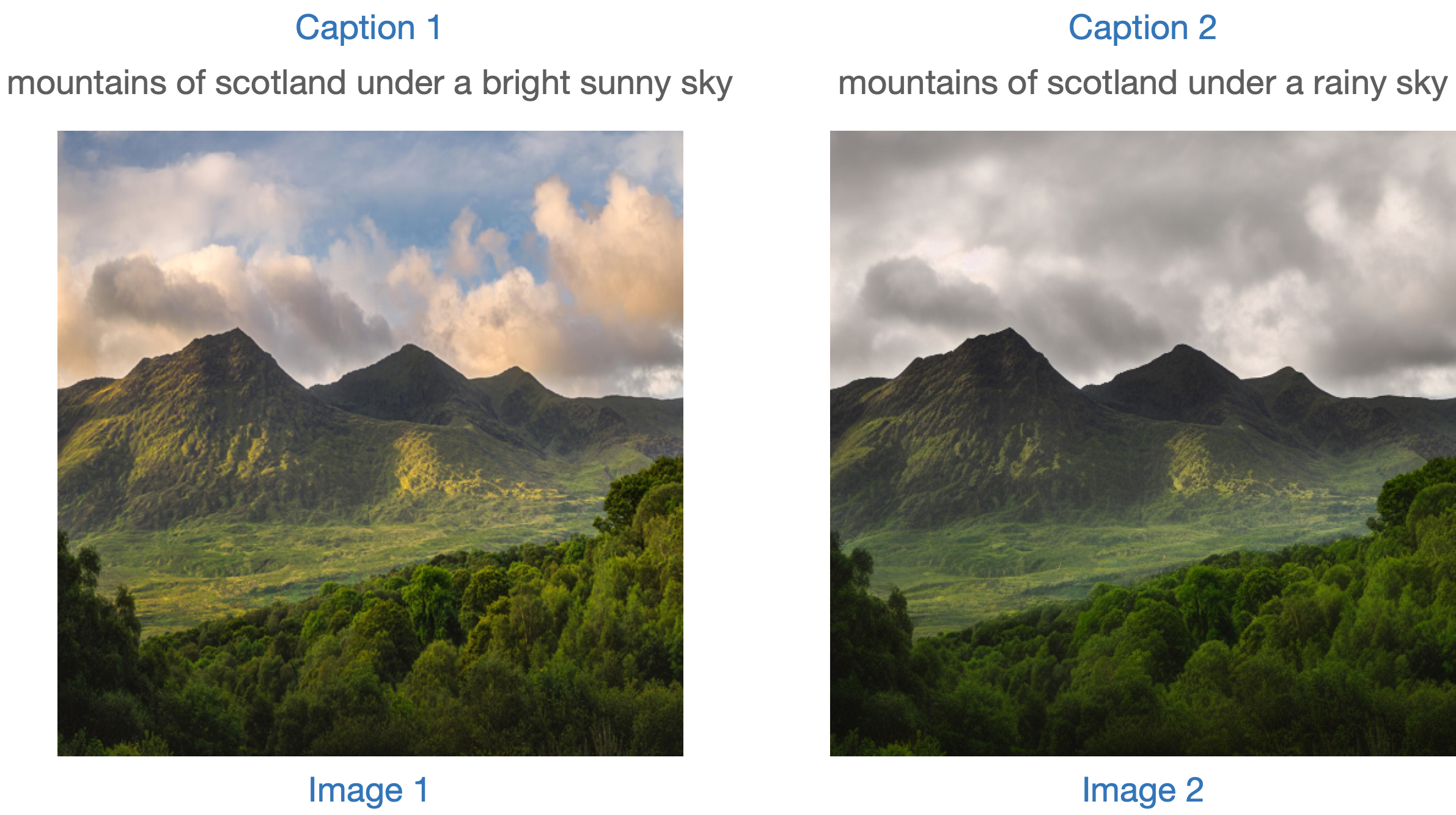
모델을 평가하는 한 가지 전략은 두 이미지 캡션 간의 변경과([CLIP-Guided Domain Adaptation of Image Generators](https://huggingface.co/papers/2108.00946)에서 보여줍니다) 함께 두 이미지 사이의 변경의 일관성을 측정하는 것입니다 ([CLIP](https://huggingface.co/docs/transformers/model_doc/clip) 공간에서). 이를 "**CLIP 방향성 유사성**"이라고 합니다.
- 캡션 1은 편집할 이미지 (이미지 1)에 해당합니다.
- 캡션 2는 편집된 이미지 (이미지 2)에 해당합니다. 편집 지시를 반영해야 합니다.
다음은 그림으로 된 개요입니다:
우리는 이 측정 항목을 구현하기 위해 미니 데이터 세트를 준비했습니다. 먼저 데이터 세트를 로드해 보겠습니다.
```python
from datasets import load_dataset
dataset = load_dataset("sayakpaul/instructpix2pix-demo", split="train")
dataset.features
```
```bash
{'input': Value(dtype='string', id=None),
'edit': Value(dtype='string', id=None),
'output': Value(dtype='string', id=None),
'image': Image(decode=True, id=None)}
```
여기에는 다음과 같은 항목이 있습니다:
- `input`은 `image`에 해당하는 캡션입니다.
- `edit`은 편집 지시사항을 나타냅니다.
- `output`은 `edit` 지시사항을 반영한 수정된 캡션입니다.
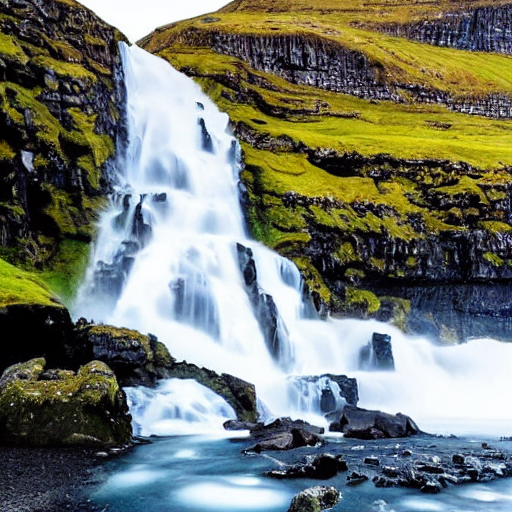
샘플을 살펴보겠습니다.
```python
idx = 0
print(f"Original caption: {dataset[idx]['input']}")
print(f"Edit instruction: {dataset[idx]['edit']}")
print(f"Modified caption: {dataset[idx]['output']}")
```
```bash
Original caption: 2. FAROE ISLANDS: An archipelago of 18 mountainous isles in the North Atlantic Ocean between Norway and Iceland, the Faroe Islands has 'everything you could hope for', according to Big 7 Travel. It boasts 'crystal clear waterfalls, rocky cliffs that seem to jut out of nowhere and velvety green hills'
Edit instruction: make the isles all white marble
Modified caption: 2. WHITE MARBLE ISLANDS: An archipelago of 18 mountainous white marble isles in the North Atlantic Ocean between Norway and Iceland, the White Marble Islands has 'everything you could hope for', according to Big 7 Travel. It boasts 'crystal clear waterfalls, rocky cliffs that seem to jut out of nowhere and velvety green hills'
```
다음은 이미지입니다:
```python
dataset[idx]["image"]
```
먼저 편집 지시사항을 사용하여 데이터 세트의 이미지를 편집하고 방향 유사도를 계산합니다.
[`StableDiffusionInstructPix2PixPipeline`]를 먼저 로드합니다:
```python
from diffusers import StableDiffusionInstructPix2PixPipeline
instruct_pix2pix_pipeline = StableDiffusionInstructPix2PixPipeline.from_pretrained(
"timbrooks/instruct-pix2pix", torch_dtype=torch.float16
).to(device)
```
이제 편집을 수행합니다:
```python
import numpy as np
def edit_image(input_image, instruction):
image = instruct_pix2pix_pipeline(
instruction,
image=input_image,
output_type="np",
generator=generator,
).images[0]
return image
input_images = []
original_captions = []
modified_captions = []
edited_images = []
for idx in range(len(dataset)):
input_image = dataset[idx]["image"]
edit_instruction = dataset[idx]["edit"]
edited_image = edit_image(input_image, edit_instruction)
input_images.append(np.array(input_image))
original_captions.append(dataset[idx]["input"])
modified_captions.append(dataset[idx]["output"])
edited_images.append(edited_image)
```
방향 유사도를 계산하기 위해서는 먼저 CLIP의 이미지와 텍스트 인코더를 로드합니다:
```python
from transformers import (
CLIPTokenizer,
CLIPTextModelWithProjection,
CLIPVisionModelWithProjection,
CLIPImageProcessor,
)
clip_id = "openai/clip-vit-large-patch14"
tokenizer = CLIPTokenizer.from_pretrained(clip_id)
text_encoder = CLIPTextModelWithProjection.from_pretrained(clip_id).to(device)
image_processor = CLIPImageProcessor.from_pretrained(clip_id)
image_encoder = CLIPVisionModelWithProjection.from_pretrained(clip_id).to(device)
```
주목할 점은 특정한 CLIP 체크포인트인 `openai/clip-vit-large-patch14`를 사용하고 있다는 것입니다. 이는 Stable Diffusion 사전 훈련이 이 CLIP 변형체와 함께 수행되었기 때문입니다. 자세한 내용은 [문서](https://huggingface.co/docs/transformers/model_doc/clip)를 참조하세요.
다음으로, 방향성 유사도를 계산하기 위해 PyTorch의 `nn.Module`을 준비합니다:
```python
import torch.nn as nn
import torch.nn.functional as F
class DirectionalSimilarity(nn.Module):
def __init__(self, tokenizer, text_encoder, image_processor, image_encoder):
super().__init__()
self.tokenizer = tokenizer
self.text_encoder = text_encoder
self.image_processor = image_processor
self.image_encoder = image_encoder
def preprocess_image(self, image):
image = self.image_processor(image, return_tensors="pt")["pixel_values"]
return {"pixel_values": image.to(device)}
def tokenize_text(self, text):
inputs = self.tokenizer(
text,
max_length=self.tokenizer.model_max_length,
padding="max_length",
truncation=True,
return_tensors="pt",
)
return {"input_ids": inputs.input_ids.to(device)}
def encode_image(self, image):
preprocessed_image = self.preprocess_image(image)
image_features = self.image_encoder(**preprocessed_image).image_embeds
image_features = image_features / image_features.norm(dim=1, keepdim=True)
return image_features
def encode_text(self, text):
tokenized_text = self.tokenize_text(text)
text_features = self.text_encoder(**tokenized_text).text_embeds
text_features = text_features / text_features.norm(dim=1, keepdim=True)
return text_features
def compute_directional_similarity(self, img_feat_one, img_feat_two, text_feat_one, text_feat_two):
sim_direction = F.cosine_similarity(img_feat_two - img_feat_one, text_feat_two - text_feat_one)
return sim_direction
def forward(self, image_one, image_two, caption_one, caption_two):
img_feat_one = self.encode_image(image_one)
img_feat_two = self.encode_image(image_two)
text_feat_one = self.encode_text(caption_one)
text_feat_two = self.encode_text(caption_two)
directional_similarity = self.compute_directional_similarity(
img_feat_one, img_feat_two, text_feat_one, text_feat_two
)
return directional_similarity
```
이제 `DirectionalSimilarity`를 사용해 보겠습니다.
```python
dir_similarity = DirectionalSimilarity(tokenizer, text_encoder, image_processor, image_encoder)
scores = []
for i in range(len(input_images)):
original_image = input_images[i]
original_caption = original_captions[i]
edited_image = edited_images[i]
modified_caption = modified_captions[i]
similarity_score = dir_similarity(original_image, edited_image, original_caption, modified_caption)
scores.append(float(similarity_score.detach().cpu()))
print(f"CLIP directional similarity: {np.mean(scores)}")
# CLIP directional similarity: 0.0797976553440094
```
CLIP 점수와 마찬가지로, CLIP 방향 유사성이 높을수록 좋습니다.
`StableDiffusionInstructPix2PixPipeline`은 `image_guidance_scale`과 `guidance_scale`이라는 두 가지 인자를 노출시킵니다. 이 두 인자를 조정하여 최종 편집된 이미지의 품질을 제어할 수 있습니다. 이 두 인자의 영향을 실험해보고 방향 유사성에 미치는 영향을 확인해보기를 권장합니다.
이러한 메트릭의 개념을 확장하여 원본 이미지와 편집된 버전의 유사성을 측정할 수 있습니다. 이를 위해 `F.cosine_similarity(img_feat_two, img_feat_one)`을 사용할 수 있습니다. 이러한 종류의 편집에서는 이미지의 주요 의미가 최대한 보존되어야 합니다. 즉, 높은 유사성 점수를 얻어야 합니다.
[`StableDiffusionPix2PixZeroPipeline`](https://huggingface.co/docs/diffusers/main/en/api/pipelines/pix2pix_zero#diffusers.StableDiffusionPix2PixZeroPipeline)와 같은 유사한 파이프라인에도 이러한 메트릭을 사용할 수 있습니다.
> [!TIP]
> CLIP 점수와 CLIP 방향 유사성 모두 CLIP 모델에 의존하기 때문에 평가가 편향될 수 있습니다
***IS, FID (나중에 설명할 예정), 또는 KID와 같은 메트릭을 확장하는 것은 어려울 수 있습니다***. 평가 중인 모델이 대규모 이미지 캡셔닝 데이터셋 (예: [LAION-5B 데이터셋](https://laion.ai/blog/laion-5b/))에서 사전 훈련되었을 때 이는 문제가 될 수 있습니다. 왜냐하면 이러한 메트릭의 기반에는 중간 이미지 특징을 추출하기 위해 ImageNet-1k 데이터셋에서 사전 훈련된 InceptionNet이 사용되기 때문입니다. Stable Diffusion의 사전 훈련 데이터셋은 InceptionNet의 사전 훈련 데이터셋과 겹치는 부분이 제한적일 수 있으므로 따라서 여기에는 좋은 후보가 아닙니다.
***위의 메트릭을 사용하면 클래스 조건이 있는 모델을 평가할 수 있습니다. 예를 들어, [DiT](https://huggingface.co/docs/diffusers/main/en/api/pipelines/dit). 이는 ImageNet-1k 클래스에 조건을 걸고 사전 훈련되었습니다.***
### 클래스 조건화 이미지 생성[[class-conditioned-image-generation]]
클래스 조건화 생성 모델은 일반적으로 [ImageNet-1k](https://huggingface.co/datasets/imagenet-1k)와 같은 클래스 레이블이 지정된 데이터셋에서 사전 훈련됩니다. 이러한 모델을 평가하는 인기있는 지표에는 Fréchet Inception Distance (FID), Kernel Inception Distance (KID) 및 Inception Score (IS)가 있습니다. 이 문서에서는 FID ([Heusel et al.](https://huggingface.co/papers/1706.08500))에 초점을 맞추고 있습니다. [`DiTPipeline`](https://huggingface.co/docs/diffusers/api/pipelines/dit)을 사용하여 FID를 계산하는 방법을 보여줍니다. 이는 내부적으로 [DiT 모델](https://huggingface.co/papers/2212.09748)을 사용합니다.
FID는 두 개의 이미지 데이터셋이 얼마나 유사한지를 측정하는 것을 목표로 합니다. [이 자료](https://mmgeneration.readthedocs.io/en/latest/quick_run.html#fid)에 따르면:
> Fréchet Inception Distance는 두 개의 이미지 데이터셋 간의 유사성을 측정하는 지표입니다. 시각적 품질에 대한 인간 판단과 잘 상관되는 것으로 나타났으며, 주로 생성적 적대 신경망의 샘플 품질을 평가하는 데 사용됩니다. FID는 Inception 네트워크의 특징 표현에 맞게 적합한 두 개의 가우시안 사이의 Fréchet 거리를 계산하여 구합니다.
이 두 개의 데이터셋은 실제 이미지 데이터셋과 가짜 이미지 데이터셋(우리의 경우 생성된 이미지)입니다. FID는 일반적으로 두 개의 큰 데이터셋으로 계산됩니다. 그러나 이 문서에서는 두 개의 미니 데이터셋으로 작업할 것입니다.
먼저 ImageNet-1k 훈련 세트에서 몇 개의 이미지를 다운로드해 봅시다:
```python
from zipfile import ZipFile
import requests
def download(url, local_filepath):
r = requests.get(url)
with open(local_filepath, "wb") as f:
f.write(r.content)
return local_filepath
dummy_dataset_url = "https://hf.co/datasets/sayakpaul/sample-datasets/resolve/main/sample-imagenet-images.zip"
local_filepath = download(dummy_dataset_url, dummy_dataset_url.split("/")[-1])
with ZipFile(local_filepath, "r") as zipper:
zipper.extractall(".")
```
```python
from PIL import Image
import os
dataset_path = "sample-imagenet-images"
image_paths = sorted([os.path.join(dataset_path, x) for x in os.listdir(dataset_path)])
real_images = [np.array(Image.open(path).convert("RGB")) for path in image_paths]
```
다음은 ImageNet-1k classes의 이미지 10개입니다 : "cassette_player", "chain_saw" (x2), "church", "gas_pump" (x3), "parachute" (x2), 그리고 "tench".
[Stable Diffusion](https://huggingface.co/docs/diffusers/stable_diffusion)와 같은 생성 모델의 평가는 주관적인 성격을 가지고 있습니다. 그러나 실무자와 연구자로서 우리는 종종 다양한 가능성 중에서 신중한 선택을 해야 합니다. 그래서 다양한 생성 모델 (GAN, Diffusion 등)을 사용할 때 어떻게 선택해야 할까요?
정성적인 평가는 모델의 이미지 품질에 대한 주관적인 평가이므로 오류가 발생할 수 있고 결정에 잘못된 영향을 미칠 수 있습니다. 반면, 정량적인 평가는 이미지 품질과 직접적인 상관관계를 갖지 않을 수 있습니다. 따라서 일반적으로 정성적 평가와 정량적 평가를 모두 고려하는 것이 더 강력한 신호를 제공하여 모델 선택에 도움이 됩니다.
이 문서에서는 Diffusion 모델을 평가하기 위한 정성적 및 정량적 방법에 대해 상세히 설명합니다. 정량적 방법에 대해서는 특히 `diffusers`와 함께 구현하는 방법에 초점을 맞추었습니다.
이 문서에서 보여진 방법들은 기반 생성 모델을 고정시키고 다양한 [노이즈 스케줄러](https://huggingface.co/docs/diffusers/main/en/api/schedulers/overview)를 평가하는 데에도 사용할 수 있습니다.
## 시나리오[[scenarios]]
다음과 같은 파이프라인을 사용하여 Diffusion 모델을 다룹니다:
- 텍스트로 안내된 이미지 생성 (예: [`StableDiffusionPipeline`](https://huggingface.co/docs/diffusers/main/en/api/pipelines/stable_diffusion/text2img)).
- 입력 이미지에 추가로 조건을 건 텍스트로 안내된 이미지 생성 (예: [`StableDiffusionImg2ImgPipeline`](https://huggingface.co/docs/diffusers/main/en/api/pipelines/stable_diffusion/img2img) 및 [`StableDiffusionInstructPix2PixPipeline`](https://huggingface.co/docs/diffusers/main/en/api/pipelines/pix2pix)).
- 클래스 조건화된 이미지 생성 모델 (예: [`DiTPipeline`](https://huggingface.co/docs/diffusers/main/en/api/pipelines/dit)).
## 정성적 평가[[qualitative-evaluation]]
정성적 평가는 일반적으로 생성된 이미지의 인간 평가를 포함합니다. 품질은 구성성, 이미지-텍스트 일치, 공간 관계 등과 같은 측면에서 측정됩니다. 일반적인 프롬프트는 주관적인 지표에 대한 일정한 기준을 제공합니다.
DrawBench와 PartiPrompts는 정성적인 벤치마킹에 사용되는 프롬프트 데이터셋입니다. DrawBench와 PartiPrompts는 각각 [Imagen](https://imagen.research.google/)과 [Parti](https://parti.research.google/)에서 소개되었습니다.
[Parti 공식 웹사이트](https://parti.research.google/)에서 다음과 같이 설명하고 있습니다:
> PartiPrompts (P2)는 이 작업의 일부로 공개되는 영어로 된 1600개 이상의 다양한 프롬프트 세트입니다. P2는 다양한 범주와 도전 측면에서 모델의 능력을 측정하는 데 사용할 수 있습니다.

PartiPrompts는 다음과 같은 열을 가지고 있습니다:
- 프롬프트 (Prompt)
- 프롬프트의 카테고리 (예: "Abstract", "World Knowledge" 등)
- 난이도를 반영한 챌린지 (예: "Basic", "Complex", "Writing & Symbols" 등)
이러한 벤치마크는 서로 다른 이미지 생성 모델을 인간 평가로 비교할 수 있도록 합니다.
이를 위해 🧨 Diffusers 팀은 **Open Parti Prompts**를 구축했습니다. 이는 Parti Prompts를 기반으로 한 커뮤니티 기반의 질적 벤치마크로, 최첨단 오픈 소스 확산 모델을 비교하는 데 사용됩니다:
- [Open Parti Prompts 게임](https://huggingface.co/spaces/OpenGenAI/open-parti-prompts): 10개의 parti prompt에 대해 4개의 생성된 이미지가 제시되며, 사용자는 프롬프트에 가장 적합한 이미지를 선택합니다.
- [Open Parti Prompts 리더보드](https://huggingface.co/spaces/OpenGenAI/parti-prompts-leaderboard): 현재 최고의 오픈 소스 diffusion 모델들을 서로 비교하는 리더보드입니다.
이미지를 수동으로 비교하려면, `diffusers`를 사용하여 몇가지 PartiPrompts를 어떻게 활용할 수 있는지 알아봅시다.
다음은 몇 가지 다른 도전에서 샘플링한 프롬프트를 보여줍니다: Basic, Complex, Linguistic Structures, Imagination, Writing & Symbols. 여기서는 PartiPrompts를 [데이터셋](https://huggingface.co/datasets/nateraw/parti-prompts)으로 사용합니다.
```python
from datasets import load_dataset
# prompts = load_dataset("nateraw/parti-prompts", split="train")
# prompts = prompts.shuffle()
# sample_prompts = [prompts[i]["Prompt"] for i in range(5)]
# Fixing these sample prompts in the interest of reproducibility.
sample_prompts = [
"a corgi",
"a hot air balloon with a yin-yang symbol, with the moon visible in the daytime sky",
"a car with no windows",
"a cube made of porcupine",
'The saying "BE EXCELLENT TO EACH OTHER" written on a red brick wall with a graffiti image of a green alien wearing a tuxedo. A yellow fire hydrant is on a sidewalk in the foreground.',
]
```
이제 이런 프롬프트를 사용하여 Stable Diffusion ([v1-4 checkpoint](https://huggingface.co/CompVis/stable-diffusion-v1-4))를 사용한 이미지 생성을 할 수 있습니다 :
```python
import torch
seed = 0
generator = torch.manual_seed(seed)
images = sd_pipeline(sample_prompts, num_images_per_prompt=1, generator=generator).images
```

`num_images_per_prompt`를 설정하여 동일한 프롬프트에 대해 다른 이미지를 비교할 수도 있습니다. 다른 체크포인트([v1-5](https://huggingface.co/stable-diffusion-v1-5/stable-diffusion-v1-5))로 동일한 파이프라인을 실행하면 다음과 같은 결과가 나옵니다:

다양한 모델을 사용하여 모든 프롬프트에서 생성된 여러 이미지들이 생성되면 (평가 과정에서) 이러한 결과물들은 사람 평가자들에게 점수를 매기기 위해 제시됩니다. DrawBench와 PartiPrompts 벤치마크에 대한 자세한 내용은 각각의 논문을 참조하십시오.
> [!TIP]
> 모델이 훈련 중일 때 추론 샘플을 살펴보는 것은 훈련 진행 상황을 측정하는 데 유용합니다. [훈련 스크립트](https://github.com/huggingface/diffusers/tree/main/examples/)에서는 TensorBoard와 Weights & Biases에 대한 추가 지원과 함께 이 유틸리티를 지원합니다.
## 정량적 평가[[quantitative-evaluation]]
이 섹션에서는 세 가지 다른 확산 파이프라인을 평가하는 방법을 안내합니다:
- CLIP 점수
- CLIP 방향성 유사도
- FID
### 텍스트 안내 이미지 생성[[text-guided-image-generation]]
[CLIP 점수](https://huggingface.co/papers/2104.08718)는 이미지-캡션 쌍의 호환성을 측정합니다. 높은 CLIP 점수는 높은 호환성🔼을 나타냅니다. CLIP 점수는 이미지와 캡션 사이의 의미적 유사성으로 생각할 수도 있습니다. CLIP 점수는 인간 판단과 높은 상관관계를 가지고 있습니다.
[`StableDiffusionPipeline`]을 일단 로드해봅시다:
```python
from diffusers import StableDiffusionPipeline
import torch
model_ckpt = "CompVis/stable-diffusion-v1-4"
sd_pipeline = StableDiffusionPipeline.from_pretrained(model_ckpt, torch_dtype=torch.float16).to("cuda")
```
여러 개의 프롬프트를 사용하여 이미지를 생성합니다:
```python
prompts = [
"a photo of an astronaut riding a horse on mars",
"A high tech solarpunk utopia in the Amazon rainforest",
"A pikachu fine dining with a view to the Eiffel Tower",
"A mecha robot in a favela in expressionist style",
"an insect robot preparing a delicious meal",
"A small cabin on top of a snowy mountain in the style of Disney, artstation",
]
images = sd_pipeline(prompts, num_images_per_prompt=1, output_type="np").images
print(images.shape)
# (6, 512, 512, 3)
```
그러고 나서 CLIP 점수를 계산합니다.
```python
from torchmetrics.functional.multimodal import clip_score
from functools import partial
clip_score_fn = partial(clip_score, model_name_or_path="openai/clip-vit-base-patch16")
def calculate_clip_score(images, prompts):
images_int = (images * 255).astype("uint8")
clip_score = clip_score_fn(torch.from_numpy(images_int).permute(0, 3, 1, 2), prompts).detach()
return round(float(clip_score), 4)
sd_clip_score = calculate_clip_score(images, prompts)
print(f"CLIP score: {sd_clip_score}")
# CLIP score: 35.7038
```
위의 예제에서는 각 프롬프트 당 하나의 이미지를 생성했습니다. 만약 프롬프트 당 여러 이미지를 생성한다면, 프롬프트 당 생성된 이미지의 평균 점수를 사용해야 합니다.
이제 [`StableDiffusionPipeline`]과 호환되는 두 개의 체크포인트를 비교하려면, 파이프라인을 호출할 때 generator를 전달해야 합니다. 먼저, 고정된 시드로 [v1-4 Stable Diffusion 체크포인트](https://huggingface.co/CompVis/stable-diffusion-v1-4)를 사용하여 이미지를 생성합니다:
```python
seed = 0
generator = torch.manual_seed(seed)
images = sd_pipeline(prompts, num_images_per_prompt=1, generator=generator, output_type="np").images
```
그런 다음 [v1-5 checkpoint](https://huggingface.co/stable-diffusion-v1-5/stable-diffusion-v1-5)를 로드하여 이미지를 생성합니다:
```python
model_ckpt_1_5 = "stable-diffusion-v1-5/stable-diffusion-v1-5"
sd_pipeline_1_5 = StableDiffusionPipeline.from_pretrained(model_ckpt_1_5, torch_dtype=weight_dtype).to(device)
images_1_5 = sd_pipeline_1_5(prompts, num_images_per_prompt=1, generator=generator, output_type="np").images
```
그리고 마지막으로 CLIP 점수를 비교합니다:
```python
sd_clip_score_1_4 = calculate_clip_score(images, prompts)
print(f"CLIP Score with v-1-4: {sd_clip_score_1_4}")
# CLIP Score with v-1-4: 34.9102
sd_clip_score_1_5 = calculate_clip_score(images_1_5, prompts)
print(f"CLIP Score with v-1-5: {sd_clip_score_1_5}")
# CLIP Score with v-1-5: 36.2137
```
[v1-5](https://huggingface.co/stable-diffusion-v1-5/stable-diffusion-v1-5) 체크포인트가 이전 버전보다 더 나은 성능을 보이는 것 같습니다. 그러나 CLIP 점수를 계산하기 위해 사용한 프롬프트의 수가 상당히 적습니다. 보다 실용적인 평가를 위해서는 이 수를 훨씬 높게 설정하고, 프롬프트를 다양하게 사용해야 합니다.
> [!WARNING]
> 이 점수에는 몇 가지 제한 사항이 있습니다. 훈련 데이터셋의 캡션은 웹에서 크롤링되어 이미지와 관련된 `alt` 및 유사한 태그에서 추출되었습니다. 이들은 인간이 이미지를 설명하는 데 사용할 수 있는 것과 일치하지 않을 수 있습니다. 따라서 여기서는 몇 가지 프롬프트를 "엔지니어링"해야 했습니다.
### 이미지 조건화된 텍스트-이미지 생성[[image-conditioned-text-to-image-generation]]
이 경우, 생성 파이프라인을 입력 이미지와 텍스트 프롬프트로 조건화합니다. [`StableDiffusionInstructPix2PixPipeline`]을 예로 들어보겠습니다. 이는 편집 지시문을 입력 프롬프트로 사용하고 편집할 입력 이미지를 사용합니다.
다음은 하나의 예시입니다:

모델을 평가하는 한 가지 전략은 두 이미지 캡션 간의 변경과([CLIP-Guided Domain Adaptation of Image Generators](https://huggingface.co/papers/2108.00946)에서 보여줍니다) 함께 두 이미지 사이의 변경의 일관성을 측정하는 것입니다 ([CLIP](https://huggingface.co/docs/transformers/model_doc/clip) 공간에서). 이를 "**CLIP 방향성 유사성**"이라고 합니다.
- 캡션 1은 편집할 이미지 (이미지 1)에 해당합니다.
- 캡션 2는 편집된 이미지 (이미지 2)에 해당합니다. 편집 지시를 반영해야 합니다.
다음은 그림으로 된 개요입니다:

우리는 이 측정 항목을 구현하기 위해 미니 데이터 세트를 준비했습니다. 먼저 데이터 세트를 로드해 보겠습니다.
```python
from datasets import load_dataset
dataset = load_dataset("sayakpaul/instructpix2pix-demo", split="train")
dataset.features
```
```bash
{'input': Value(dtype='string', id=None),
'edit': Value(dtype='string', id=None),
'output': Value(dtype='string', id=None),
'image': Image(decode=True, id=None)}
```
여기에는 다음과 같은 항목이 있습니다:
- `input`은 `image`에 해당하는 캡션입니다.
- `edit`은 편집 지시사항을 나타냅니다.
- `output`은 `edit` 지시사항을 반영한 수정된 캡션입니다.
샘플을 살펴보겠습니다.
```python
idx = 0
print(f"Original caption: {dataset[idx]['input']}")
print(f"Edit instruction: {dataset[idx]['edit']}")
print(f"Modified caption: {dataset[idx]['output']}")
```
```bash
Original caption: 2. FAROE ISLANDS: An archipelago of 18 mountainous isles in the North Atlantic Ocean between Norway and Iceland, the Faroe Islands has 'everything you could hope for', according to Big 7 Travel. It boasts 'crystal clear waterfalls, rocky cliffs that seem to jut out of nowhere and velvety green hills'
Edit instruction: make the isles all white marble
Modified caption: 2. WHITE MARBLE ISLANDS: An archipelago of 18 mountainous white marble isles in the North Atlantic Ocean between Norway and Iceland, the White Marble Islands has 'everything you could hope for', according to Big 7 Travel. It boasts 'crystal clear waterfalls, rocky cliffs that seem to jut out of nowhere and velvety green hills'
```
다음은 이미지입니다:
```python
dataset[idx]["image"]
```

먼저 편집 지시사항을 사용하여 데이터 세트의 이미지를 편집하고 방향 유사도를 계산합니다.
[`StableDiffusionInstructPix2PixPipeline`]를 먼저 로드합니다:
```python
from diffusers import StableDiffusionInstructPix2PixPipeline
instruct_pix2pix_pipeline = StableDiffusionInstructPix2PixPipeline.from_pretrained(
"timbrooks/instruct-pix2pix", torch_dtype=torch.float16
).to(device)
```
이제 편집을 수행합니다:
```python
import numpy as np
def edit_image(input_image, instruction):
image = instruct_pix2pix_pipeline(
instruction,
image=input_image,
output_type="np",
generator=generator,
).images[0]
return image
input_images = []
original_captions = []
modified_captions = []
edited_images = []
for idx in range(len(dataset)):
input_image = dataset[idx]["image"]
edit_instruction = dataset[idx]["edit"]
edited_image = edit_image(input_image, edit_instruction)
input_images.append(np.array(input_image))
original_captions.append(dataset[idx]["input"])
modified_captions.append(dataset[idx]["output"])
edited_images.append(edited_image)
```
방향 유사도를 계산하기 위해서는 먼저 CLIP의 이미지와 텍스트 인코더를 로드합니다:
```python
from transformers import (
CLIPTokenizer,
CLIPTextModelWithProjection,
CLIPVisionModelWithProjection,
CLIPImageProcessor,
)
clip_id = "openai/clip-vit-large-patch14"
tokenizer = CLIPTokenizer.from_pretrained(clip_id)
text_encoder = CLIPTextModelWithProjection.from_pretrained(clip_id).to(device)
image_processor = CLIPImageProcessor.from_pretrained(clip_id)
image_encoder = CLIPVisionModelWithProjection.from_pretrained(clip_id).to(device)
```
주목할 점은 특정한 CLIP 체크포인트인 `openai/clip-vit-large-patch14`를 사용하고 있다는 것입니다. 이는 Stable Diffusion 사전 훈련이 이 CLIP 변형체와 함께 수행되었기 때문입니다. 자세한 내용은 [문서](https://huggingface.co/docs/transformers/model_doc/clip)를 참조하세요.
다음으로, 방향성 유사도를 계산하기 위해 PyTorch의 `nn.Module`을 준비합니다:
```python
import torch.nn as nn
import torch.nn.functional as F
class DirectionalSimilarity(nn.Module):
def __init__(self, tokenizer, text_encoder, image_processor, image_encoder):
super().__init__()
self.tokenizer = tokenizer
self.text_encoder = text_encoder
self.image_processor = image_processor
self.image_encoder = image_encoder
def preprocess_image(self, image):
image = self.image_processor(image, return_tensors="pt")["pixel_values"]
return {"pixel_values": image.to(device)}
def tokenize_text(self, text):
inputs = self.tokenizer(
text,
max_length=self.tokenizer.model_max_length,
padding="max_length",
truncation=True,
return_tensors="pt",
)
return {"input_ids": inputs.input_ids.to(device)}
def encode_image(self, image):
preprocessed_image = self.preprocess_image(image)
image_features = self.image_encoder(**preprocessed_image).image_embeds
image_features = image_features / image_features.norm(dim=1, keepdim=True)
return image_features
def encode_text(self, text):
tokenized_text = self.tokenize_text(text)
text_features = self.text_encoder(**tokenized_text).text_embeds
text_features = text_features / text_features.norm(dim=1, keepdim=True)
return text_features
def compute_directional_similarity(self, img_feat_one, img_feat_two, text_feat_one, text_feat_two):
sim_direction = F.cosine_similarity(img_feat_two - img_feat_one, text_feat_two - text_feat_one)
return sim_direction
def forward(self, image_one, image_two, caption_one, caption_two):
img_feat_one = self.encode_image(image_one)
img_feat_two = self.encode_image(image_two)
text_feat_one = self.encode_text(caption_one)
text_feat_two = self.encode_text(caption_two)
directional_similarity = self.compute_directional_similarity(
img_feat_one, img_feat_two, text_feat_one, text_feat_two
)
return directional_similarity
```
이제 `DirectionalSimilarity`를 사용해 보겠습니다.
```python
dir_similarity = DirectionalSimilarity(tokenizer, text_encoder, image_processor, image_encoder)
scores = []
for i in range(len(input_images)):
original_image = input_images[i]
original_caption = original_captions[i]
edited_image = edited_images[i]
modified_caption = modified_captions[i]
similarity_score = dir_similarity(original_image, edited_image, original_caption, modified_caption)
scores.append(float(similarity_score.detach().cpu()))
print(f"CLIP directional similarity: {np.mean(scores)}")
# CLIP directional similarity: 0.0797976553440094
```
CLIP 점수와 마찬가지로, CLIP 방향 유사성이 높을수록 좋습니다.
`StableDiffusionInstructPix2PixPipeline`은 `image_guidance_scale`과 `guidance_scale`이라는 두 가지 인자를 노출시킵니다. 이 두 인자를 조정하여 최종 편집된 이미지의 품질을 제어할 수 있습니다. 이 두 인자의 영향을 실험해보고 방향 유사성에 미치는 영향을 확인해보기를 권장합니다.
이러한 메트릭의 개념을 확장하여 원본 이미지와 편집된 버전의 유사성을 측정할 수 있습니다. 이를 위해 `F.cosine_similarity(img_feat_two, img_feat_one)`을 사용할 수 있습니다. 이러한 종류의 편집에서는 이미지의 주요 의미가 최대한 보존되어야 합니다. 즉, 높은 유사성 점수를 얻어야 합니다.
[`StableDiffusionPix2PixZeroPipeline`](https://huggingface.co/docs/diffusers/main/en/api/pipelines/pix2pix_zero#diffusers.StableDiffusionPix2PixZeroPipeline)와 같은 유사한 파이프라인에도 이러한 메트릭을 사용할 수 있습니다.
> [!TIP]
> CLIP 점수와 CLIP 방향 유사성 모두 CLIP 모델에 의존하기 때문에 평가가 편향될 수 있습니다
***IS, FID (나중에 설명할 예정), 또는 KID와 같은 메트릭을 확장하는 것은 어려울 수 있습니다***. 평가 중인 모델이 대규모 이미지 캡셔닝 데이터셋 (예: [LAION-5B 데이터셋](https://laion.ai/blog/laion-5b/))에서 사전 훈련되었을 때 이는 문제가 될 수 있습니다. 왜냐하면 이러한 메트릭의 기반에는 중간 이미지 특징을 추출하기 위해 ImageNet-1k 데이터셋에서 사전 훈련된 InceptionNet이 사용되기 때문입니다. Stable Diffusion의 사전 훈련 데이터셋은 InceptionNet의 사전 훈련 데이터셋과 겹치는 부분이 제한적일 수 있으므로 따라서 여기에는 좋은 후보가 아닙니다.
***위의 메트릭을 사용하면 클래스 조건이 있는 모델을 평가할 수 있습니다. 예를 들어, [DiT](https://huggingface.co/docs/diffusers/main/en/api/pipelines/dit). 이는 ImageNet-1k 클래스에 조건을 걸고 사전 훈련되었습니다.***
### 클래스 조건화 이미지 생성[[class-conditioned-image-generation]]
클래스 조건화 생성 모델은 일반적으로 [ImageNet-1k](https://huggingface.co/datasets/imagenet-1k)와 같은 클래스 레이블이 지정된 데이터셋에서 사전 훈련됩니다. 이러한 모델을 평가하는 인기있는 지표에는 Fréchet Inception Distance (FID), Kernel Inception Distance (KID) 및 Inception Score (IS)가 있습니다. 이 문서에서는 FID ([Heusel et al.](https://huggingface.co/papers/1706.08500))에 초점을 맞추고 있습니다. [`DiTPipeline`](https://huggingface.co/docs/diffusers/api/pipelines/dit)을 사용하여 FID를 계산하는 방법을 보여줍니다. 이는 내부적으로 [DiT 모델](https://huggingface.co/papers/2212.09748)을 사용합니다.
FID는 두 개의 이미지 데이터셋이 얼마나 유사한지를 측정하는 것을 목표로 합니다. [이 자료](https://mmgeneration.readthedocs.io/en/latest/quick_run.html#fid)에 따르면:
> Fréchet Inception Distance는 두 개의 이미지 데이터셋 간의 유사성을 측정하는 지표입니다. 시각적 품질에 대한 인간 판단과 잘 상관되는 것으로 나타났으며, 주로 생성적 적대 신경망의 샘플 품질을 평가하는 데 사용됩니다. FID는 Inception 네트워크의 특징 표현에 맞게 적합한 두 개의 가우시안 사이의 Fréchet 거리를 계산하여 구합니다.
이 두 개의 데이터셋은 실제 이미지 데이터셋과 가짜 이미지 데이터셋(우리의 경우 생성된 이미지)입니다. FID는 일반적으로 두 개의 큰 데이터셋으로 계산됩니다. 그러나 이 문서에서는 두 개의 미니 데이터셋으로 작업할 것입니다.
먼저 ImageNet-1k 훈련 세트에서 몇 개의 이미지를 다운로드해 봅시다:
```python
from zipfile import ZipFile
import requests
def download(url, local_filepath):
r = requests.get(url)
with open(local_filepath, "wb") as f:
f.write(r.content)
return local_filepath
dummy_dataset_url = "https://hf.co/datasets/sayakpaul/sample-datasets/resolve/main/sample-imagenet-images.zip"
local_filepath = download(dummy_dataset_url, dummy_dataset_url.split("/")[-1])
with ZipFile(local_filepath, "r") as zipper:
zipper.extractall(".")
```
```python
from PIL import Image
import os
dataset_path = "sample-imagenet-images"
image_paths = sorted([os.path.join(dataset_path, x) for x in os.listdir(dataset_path)])
real_images = [np.array(Image.open(path).convert("RGB")) for path in image_paths]
```
다음은 ImageNet-1k classes의 이미지 10개입니다 : "cassette_player", "chain_saw" (x2), "church", "gas_pump" (x3), "parachute" (x2), 그리고 "tench".
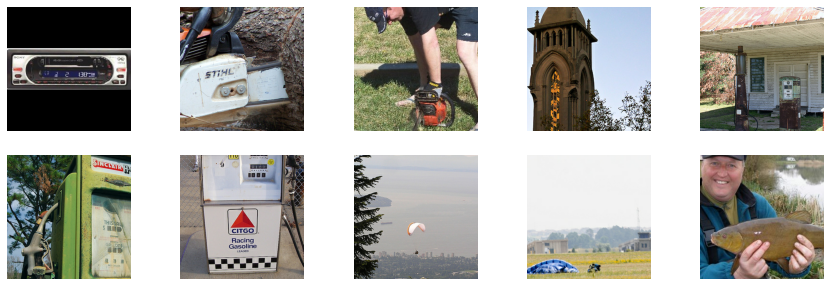
Real images.
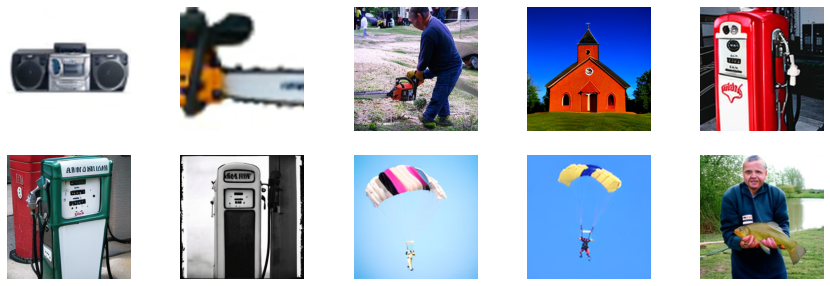
Fake images.