# Legacy adapters
These methods are still supported, especially on Stable Diffusion–family checkpoints. For new work, prefer [LoRA](../tutorials/using_peft_for_inference), [IP-Adapter](./ip_adapter), and [ControlNet](./controlnet).
## T2I-Adapter
[T2I-Adapter](https://huggingface.co/papers/2302.08453) is an adapter for controllable generation. It learns a mapping from a control signal (for example, a depth map or canny edges) into a pretrained model's internal features and adds that guidance during generation. It is similar in role to [ControlNet](./controlnet), but it is a lighter plugged-in adapter.
Load a control-conditioned adapter, then load the pipeline with [`~DiffusionPipeline.from_pretrained`] and pass it with `adapter=`.
```py
import torch
from diffusers import T2IAdapter, StableDiffusionXLAdapterPipeline, AutoencoderKL
t2i_adapter = T2IAdapter.from_pretrained(
"TencentARC/t2i-adapter-canny-sdxl-1.0",
dtype=torch.float16,
)
```
Generate a canny image with [opencv-python](https://github.com/opencv/opencv-python).
```py
import cv2
import numpy as np
from PIL import Image
from diffusers.utils import load_image
original_image = load_image(
"https://huggingface.co/datasets/huggingface/documentation-images/resolve/main/diffusers/non-enhanced-prompt.png"
)
image = np.array(original_image)
low_threshold = 100
high_threshold = 200
image = cv2.Canny(image, low_threshold, high_threshold)
image = image[:, :, None]
image = np.concatenate([image, image, image], axis=2)
canny_image = Image.fromarray(image)
```
Pass the canny image to the pipeline to generate an image.
```py
vae = AutoencoderKL.from_pretrained("madebyollin/sdxl-vae-fp16-fix", dtype=torch.float16)
pipeline = StableDiffusionXLAdapterPipeline.from_pretrained(
"stabilityai/stable-diffusion-xl-base-1.0",
adapter=t2i_adapter,
vae=vae,
dtype=torch.float16,
).to("cuda") # or "mps", "xpu", "cpu"
prompt = """
A photorealistic overhead image of a cat reclining sideways in a flamingo pool floatie holding a margarita.
The cat is floating leisurely in the pool and completely relaxed and happy.
"""
pipeline(
prompt,
image=canny_image,
num_inference_steps=100,
guidance_scale=10,
).images[0]
```
original imagecanny imagegenerated image
See also [T2I-Adapter training](../training/t2i_adapters).
### MultiAdapter
Compose multiple controls (for example, canny and depth) with [`MultiAdapter`]. Pass a list of adapters into `MultiAdapter`, then pass the matching control images as a list to the pipeline.
```py
import torch
from diffusers.utils import load_image
from diffusers import StableDiffusionXLAdapterPipeline, AutoencoderKL, MultiAdapter, T2IAdapter
canny_image = load_image(
"https://huggingface.co/datasets/huggingface/documentation-images/resolve/main/diffusers/canny-cat.png"
)
depth_image = load_image(
"https://huggingface.co/datasets/huggingface/documentation-images/resolve/main/diffusers/sdxl_depth_image.png"
)
controls = [canny_image, depth_image]
prompt = ["""
a relaxed rabbit sitting on a striped towel next to a pool with a tropical drink nearby,
bright sunny day, vacation scene, 35mm photograph, film, professional, 4k, highly detailed
"""]
adapters = MultiAdapter(
[
T2IAdapter.from_pretrained("TencentARC/t2i-adapter-canny-sdxl-1.0", dtype=torch.float16),
T2IAdapter.from_pretrained("TencentARC/t2i-adapter-depth-midas-sdxl-1.0", dtype=torch.float16),
]
)
```
Pass the adapters, prompt, and control images to [`StableDiffusionXLAdapterPipeline`]. Use the `adapter_conditioning_scale` parameter to determine how much weight to assign to each control.
```py
vae = AutoencoderKL.from_pretrained("madebyollin/sdxl-vae-fp16-fix", dtype=torch.float16)
pipeline = StableDiffusionXLAdapterPipeline.from_pretrained(
"stabilityai/stable-diffusion-xl-base-1.0",
dtype=torch.float16,
vae=vae,
adapter=adapters,
).to("cuda") # or "mps", "xpu", "cpu"
pipeline(
prompt,
image=controls,
height=1024,
width=1024,
adapter_conditioning_scale=[0.7, 0.7]
).images[0]
```
canny imagedepth mapgenerated image
## Textual Inversion
[Textual Inversion](https://huggingface.co/papers/2208.01618) personalizes a model to a concept from 3-5 images by fine-tuning word embeddings bound to a unique token (``). You can then use that token in your prompt to generate the concept (for example, pixel art).
Textual Inversion weights are typically only a few KBs because they are only word embeddings. Load them after [`~DiffusionPipeline.from_pretrained`] with [`~loaders.TextualInversionLoaderMixin.load_textual_inversion`], and include the unique token in the prompt to trigger generation.
```py
import torch
from diffusers import AutoPipelineForText2Image
pipeline = AutoPipelineForText2Image.from_pretrained(
"stable-diffusion-v1-5/stable-diffusion-v1-5",
dtype=torch.float16
).to("cuda") # or "mps", "xpu", "cpu"
```
```py
pipeline.load_textual_inversion("sd-concepts-library/gta5-artwork")
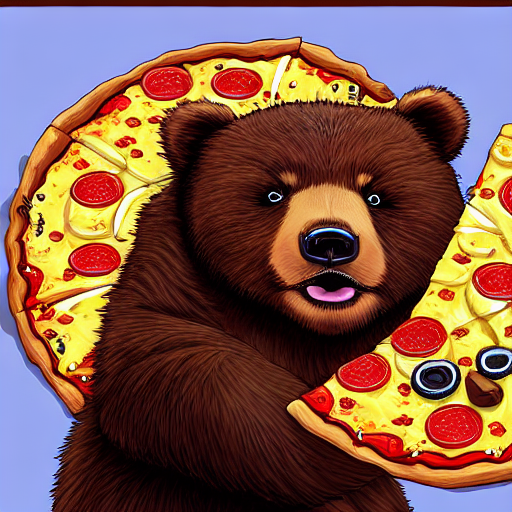
prompt = "A cute brown bear eating a slice of pizza, stunning color scheme, masterpiece, illustration, style"
pipeline(prompt).images[0]
```
To train embeddings, see [Train textual inversion](../training/text_inversion).
Textual Inversion can also be trained to learn *negative embeddings* to steer generation away from unwanted characteristics such as "blurry" or "ugly", making it useful for improving image quality.
EasyNegative is a widely used negative embedding that contains multiple learned negative concepts. Load the negative embeddings and specify the file name and token associated with the negative embeddings. Pass the token to `negative_prompt` in your pipeline to activate it.
```py
import torch
from diffusers import AutoPipelineForText2Image
pipeline = AutoPipelineForText2Image.from_pretrained(
"stable-diffusion-v1-5/stable-diffusion-v1-5",
dtype=torch.float16
).to("cuda") # or "mps", "xpu", "cpu"
pipeline.load_textual_inversion(
"EvilEngine/easynegative",
weight_name="easynegative.safetensors",
token="easynegative"
)
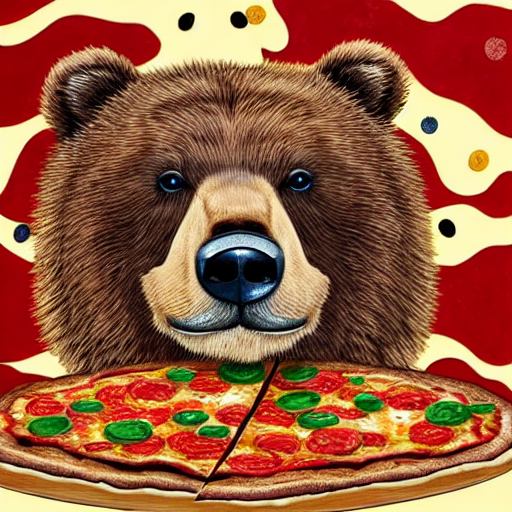
prompt = "A cute brown bear eating a slice of pizza, stunning color scheme, masterpiece, illustration"
negative_prompt = "easynegative"
pipeline(prompt, negative_prompt=negative_prompt).images[0]
```